

Management Portal Login and Re-install Errors
Problem
Section titled “Problem”All the following solutions will help Troubleshoot the Management Portal.
Solution-1
Section titled “Solution-1”When a user is selecting re-install from the management portal an error occurs “Re-Install is not configured
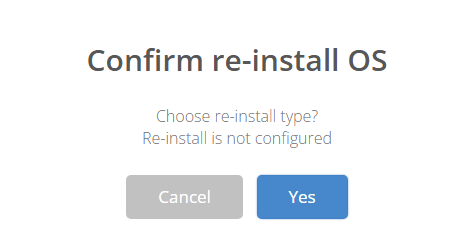
Promote Point Configuration to OSD child points
-
Right click on OSD dev (Parent point) and select Promote
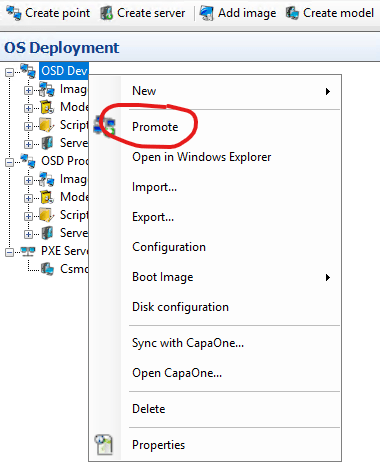
-
Expand Deployment Point and set a checkmark in Point Configuration
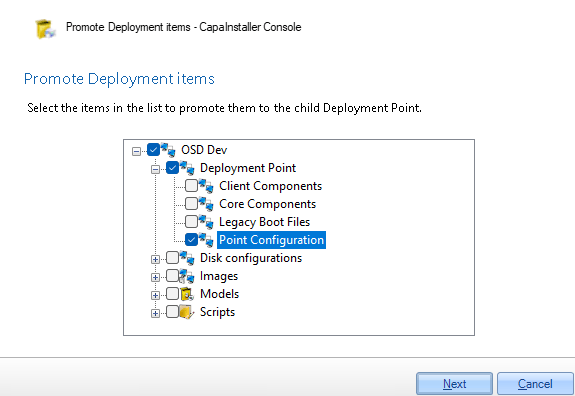
-
Once promoted, log out of Management Portal and login again. Try to re-install the device. You should be able to select the Install type now
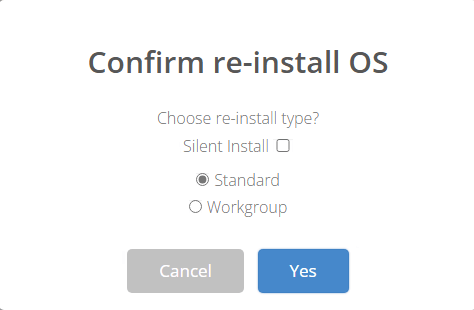
Solution-2
Section titled “Solution-2”In some cases when logging into the management portal you will be met with the following error message. Unable to load DLL ‘fast-aes.dll’: Access is denied. (Exception from HRESULT: 0x80070005 (E_ACCESSDENIED))
This error occurs because the management portal is trying to overwrite some files in the Windows temp folder.
- Browse to this C:\Windows\Temp\fast-aes-64-w3wp location in the file explorer.
- Now delete all the files in the folder.
- Open your IIS manager and restart the website where your management portal is located under. (This is usually the Default Web Site.)

- After the files have been deleted and the management portal has been restartede, you should now be able to login into the management portal again.