

CapaBitLocker v4.0 - Variables
CapaBitLocker v4.0 released on December 16, 2022
BitLocker variables
Section titled “BitLocker variables”gsDrivesToEncrypt / gsDrivesToDecrypt
The variable value can be All or System
Default setting = All (recommended)
All = All fixed drives are encrypted/decrypted
System = Only the operating system drive is encrypted/decrypted
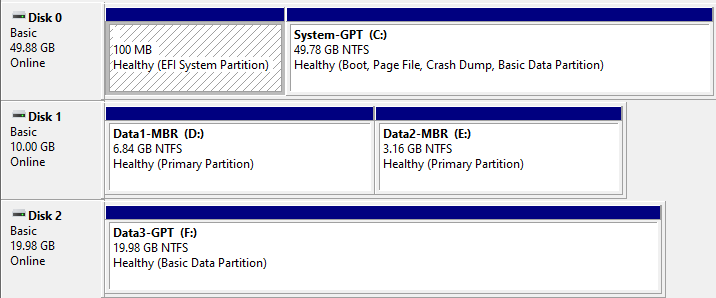 Disk Management
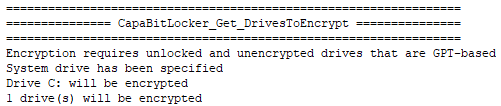 System
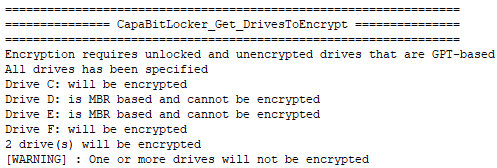 All
All
gbFailPackageOnError
The variable value can be True or False
Default setting = False (recommended)
True = Package status will be set to Failed in the CapaInstaller Console, when the first non-critical error is detected
False = Package status will be set to Installed in the CapaInstaller Console, when non-critical errors are detected
In the example below, an error is written to the logfile, because gbFailPackageOnError is set to True
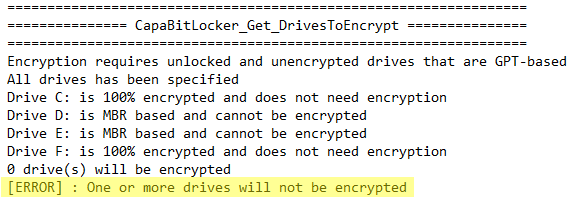 True
True
 CapaInstaller Console View
In the example below, a warning is written to the logfile, because gbFailPackageOnError is set to False
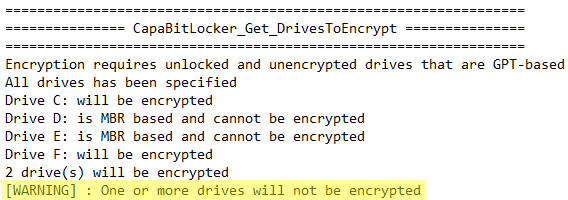 False
False
 CapaInstaller Console View
gbMaskSensitiveData
The variable value can be True or False
Default setting = True (recommended)
True = The last 4 digits of the Recovery Key ID and the Recovery Key Password is replaced with asterisk characters in the log file located on the endpoint
False = The full value of the Recovery Key ID and the Recovery Key Password is visible in the log file located on the endpoint
 True
True
gbSaveRecoveryKeyInActiveDirectory
The variable value can be True or False
Default setting = True (recommended)
True = Recovery Key is saved in Active Directory
False = Recovery Key is not saved in Active Directory
 True
True
💡 CapaBitLocker automatically detects if the domain is available before saving the recovery key in Active Directory.
gbSaveRecoveryKeyInCapaInstaller
The variable value can be True or False
Default setting = True (recommended)
True = Recovery Key is saved in CapaInstaller Custom Inventory
False = Recovery Key is not saved in CapaInstaller Custom Inventory
 True
True
gbWaitForEncryptionToComplete / gbWaitForDecryptionToComplete
The variable value can be True or False
Default setting = True
True = Package will wait for encryption of drives to finish, before changing status to Installed
False = Package will initiate encryption of drives and change status to Installed afterwards
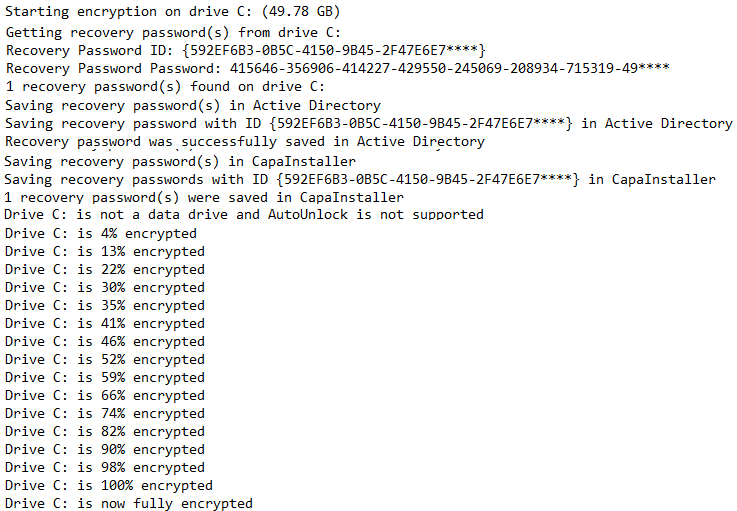
💡 All recovery keys are saved and auto-unlock on data drives are enabled, immediately after drive encryption has been initiated.
giRebootCount
The variable value can be a number between 0 and 10
Default setting = 1
0 = BitLocker is suspended infinitely and must be resumed manually
1-10 = BitLocker is suspended until the specified number of reboots has been performed
💡 BitLocker is suspended instantly.
Common variables
Section titled “Common variables”gsIpAddressesToExclude
The variable value can be a full or a partial IPv4 address on endpoints that should be excluded.
Default setting = ""
The * character must be used as a wildcard, when defining partial IPv4 addresses.
The , character must be used when defining multiple IPv4 addresses.
Example: 192.168.100.*,192.168.101.*
gsGatewayAddressesToExclude
The variable value can be a full or a partial IPv4 address on gateways that should be excluded.
Default setting = ""
The * character must be used as a wildcard, when defining partial IPv4 addresses.
The , character must be used when defining multiple IPv4 addresses.
Example: 192.168.100.*,192.168.101.*
gsDeviceNamesToExclude
The variable value can be the NetBIOS name of endpoints that should be excluded.
Default setting = ""
The , character must be used when defining multiple endpoints.
gsHardwareModelsToExclude
The variable value can be the name of the hardware models that should be excluded.
Default setting = ""
The hardware model name is matched with the “System Model” value from the “SysInfo” command.
The , character must be used when defining multiple endpoints.
gbRequirePowerConnection
The variable value can be True or False
Default setting = True
True = External power connection is required
False = External power connection is not required
💡 This setting only affects laptops.
gbDisableCustomInventoryCollection
The variable value can be True or False
Default setting = False
True = Custom inventory is not collected during package execution (not recommended)
False = Custom inventory is collected during package execution