The columns in the views are added in the column setup form. Look below to see how.
|
|
| Step |
Action |
| 1 |
Click on Reporting and Queries. |
| 2 |
Click Software |
| 3 |
Click on Tools/Software Vendor report. 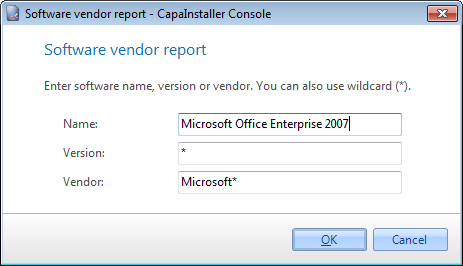 |
| 4 |
Enter a name, version, or vendor to collect data from. * Can be used a wildcard. |
| 5 |
Click OK to save the Software vendor report. It will not be saved to the database. |
| 6 |
Now the Software Vendor report can be displayed in the content view or deployed to reporting services. |
To see the Software vendor report follow the guide below
|
|
| Step |
Action |
| 1 |
Click on Reporting and Queries. |
| 2 |
Click Software |
| 3 |
Right-click the Application groups folder
 |
| 4 |
Click the Software Vendor report menu item
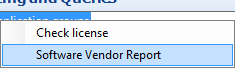 |
| 5 |
The Software Vendor report will now be displayed in the content view |

