

Patch management tree view
The following is a description of the Patch Management tree view in the main window.
The Patch Management tree
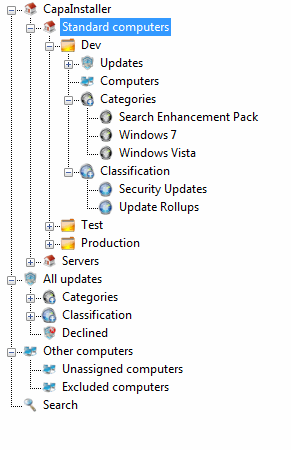
Section titled “The Patch Management tree”The tree is organized in three levels:
- Patch Management root point — the first element in the tree view. There can only be one root point.
- Patch Management child points (for example Standard computers) — below the root point there can be one or more child points, which contain the groups.
- Patch Management groups (for example Dev, Test, Production) — below the child points there can be one or more groups, which contain the updates and computers.
Under each group, folders containing updates, categories, classifications, and computers are displayed:
- Updates and All updates — the full collection of updates.
- Computers in Patch Management and All computers — used for maintenance of the computers.
- Categories and Classifications — the categories and classifications available for the updates.
Missing points or groups
Section titled “Missing points or groups”If one or more of your Patch Management points or groups are deleted or missing on the WSUS server, the tree view shows them differently: the icon turns black and white, and you cannot perform all the actions on that point or group.
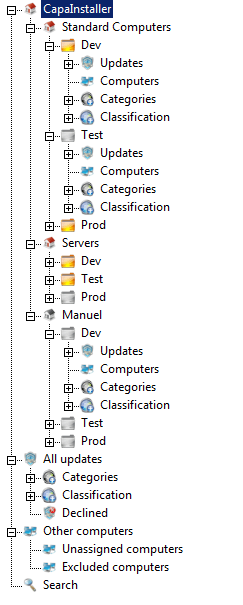
To re-create the missing points and groups, see Re-create Patch Management Point or Group.
Related tasks
Section titled “Related tasks”| If you want to… | You can… |
| Create root point | Patch Management root points |
| Create child point | Create a Patch Management child point |
| Create group | Create a Patch Management Group |
| Re-create point or groups | Re-create Patch Management Point or Group |
| Approve updates | Approve updates |