

Metering executable
Introduction
Section titled “Introduction”The following is a description of the metering executable available from the right-click menu on an Application group. The metering executable is used on application groups to create wider metering.
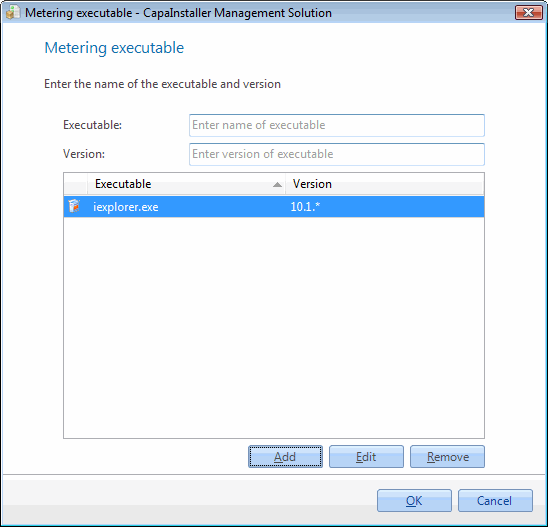
Create new metering executable
| Step | Action |
| 1 | Enter the executable name eg. iexplorer.exe |
| 2 | Enter the version of the executable version eg. 10.1.*. Wildcard * can be used to create a wider range. |
| 3 | Click Add to add the metering executable to the Application group |
| 4 | Click OK to save the changes to the database |
Edit metering executable
| Step | Action |
| 1 | Select a metering executable in the list |
| 2 | Click Edit to edit the selected metering executable |
| 3 | Enter a new executable name |
| 4 | Enter a new version |
| 5 | Click Update to add the updated metering executable |
| 6 | Click OK to save the changes to the database |
Delete metering executable
| 1 | Select a metering executable in the list |
| 2 | Click Remove to remove the metering executable from the list |
| 3 | Click OK to save the changes to the database |