

Reinstall a computer
From Configuration Management you can schedule a computer to be reinstalled using OS Deployment settings. These settings are required in order to set up a computer to be reinstalled.
A new name for the computer can be specified, and it can be scheduled to occur at a time where it isn’t being used after work hours. If it is more urgent it can be configured to reinstall the computer the next time the CapaInstaller Agent runs.
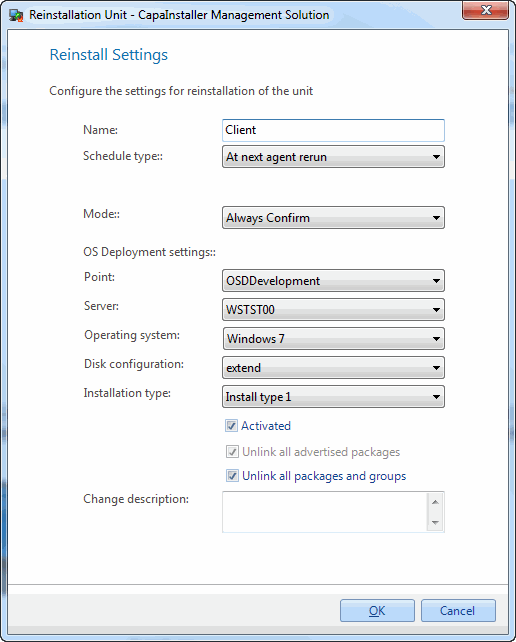
| Element | Description |
| Name | This will be the name of the computer after reinstalling it. |
| Schedule Type | You can choose between two schedule types. - At the next agent rerun - Custom schedule While configuring a custom schedule you will be able to include an, wake on LAN request. |
| Mode | Choose whether or not the user needs to confirm the reinstall. |
| OS Deployment points | The OS Point being used. |
| OS Deployment servers | A server on the OS Point selected. |
| Images | An Operating System on the OS Point selected. |
| Disk configuration | A Disk Configuration on the OS Point selected. |
| Installation type | An Installation Type. This is not mandatory. |
| Activated | While this is unchecked the computer will not be reinstalled. |
| Unlink all advertised packages | Choose whether or not all installed advertised packages should be unlinked from the computer. |
| Unlink all packages and groups | Choose whether or not the computer should be unlinked from all groups and packages. Checking this will disable the option regarding advertised packages. |
| Change description | The custom comment that will be added to the changelog. |
| Step | Action |
| 1 | Open CM/find the computer to reinstall, right-click, and click Reinstall. |
| 2 | Fill out the fields above. |
| 3 | Click OK. |
| 4 | If the Custom schedule has been selected, the settings will be saved and the schedule window will open, enabling you to create a custom schedule that defines when the reinstall should occur. |