

Define report criteria
Ensuring the correct information in the reports is done from the tree view in the Reporting Management tool. After the Items for the report have been selected the report can be specified by “define report criteria”.
| Step | Action |
| 1 | Select the Reporting and Queries plug-in. |
| 2 | Click Tools/Define criteria. |
| 3 | Select from the list the criteria you want to set on the item. And: Column: Operator: Value: 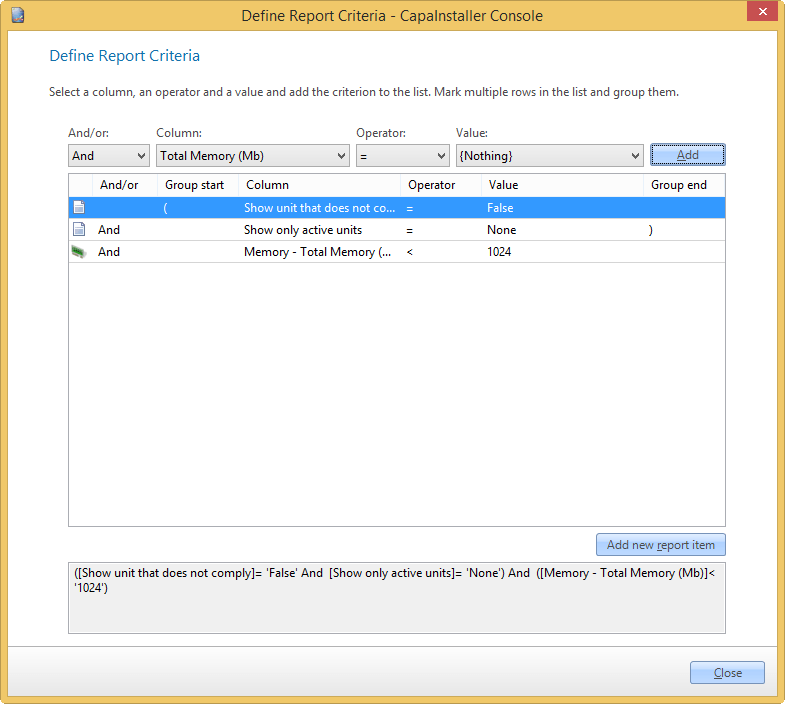 |
| 4 | Click Close. |
Group criteria
| Step | Action |
| 1 | Select two or more criteria. |
| 2 | Right-click on selected rows. |
| 3 | Click Group selected. |
Change criteria
| Step | Action |
| 1 | Right-click a criterion. |
| 2 | Click Edit Criteria. |
| 3 | Make changes. |
| 4 | Click Update. |
Delete criteria
| Step | Action |
| 1 | Right-click a criterion. |
| 2 | Click Delete criteria. |
Add Static criteria
| Step | Action |
| 1 | Right-click in the grid view or on a report item |
| 2 | Click Add new Report item. |
| 3 | Select one of the Static items in the list and click OK |
Related tasks
Section titled “Related tasks”| If you want to… | You can… |
| Add new report item criteria | Add new report item criteria |
| Create a custom made report | Create a report to see how. |
| Report Static criteria | Report static criteria can be applied like normal criteria |
| Preview a report | Preview a report to see how. |
| See recent reports | File/Recent reports, a list of the recently used reports will show. |
| Setup Columns | Column setup to see how. |
| Export to reporting services | Deploy to reporting services to see how. |
| Change column order | Reporting column order to see how. |
| Open an existing report | Open an existing report to see how. |