

Create a new PXE menu group
Introduction
Section titled “Introduction”The following is a description of how to create a PXE boot menu group.
| Step | Action |
| 1 | Right click the PXE server and select Properties →Boot Configuration…. |
| 2 | Select menu group and press Add Menu to create new PXE boot menu group. |
| 3 | Fill in Menu group name and Comment. 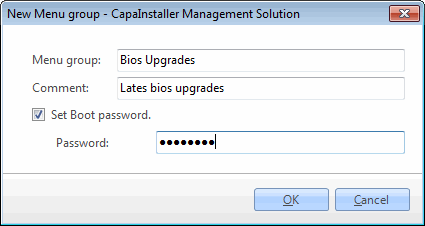 It is possible to restrict access to the Menu group by setting a password. It will be necessary to create one or more PXE boot menu items next. And create a link to this menu in an already existing Menu group. It is possible to restrict access to the Menu group by setting a password. It will be necessary to create one or more PXE boot menu items next. And create a link to this menu in an already existing Menu group. |