

Work with relations
Introduction
Section titled “Introduction”From the Unit view in Asset Management, units can be related to other units. Users can be related to computers or a printer. The possibility to create a relation is available from the right-click menus on the units.
| Element | Description |
| Relations | Relate a unit to another unit. 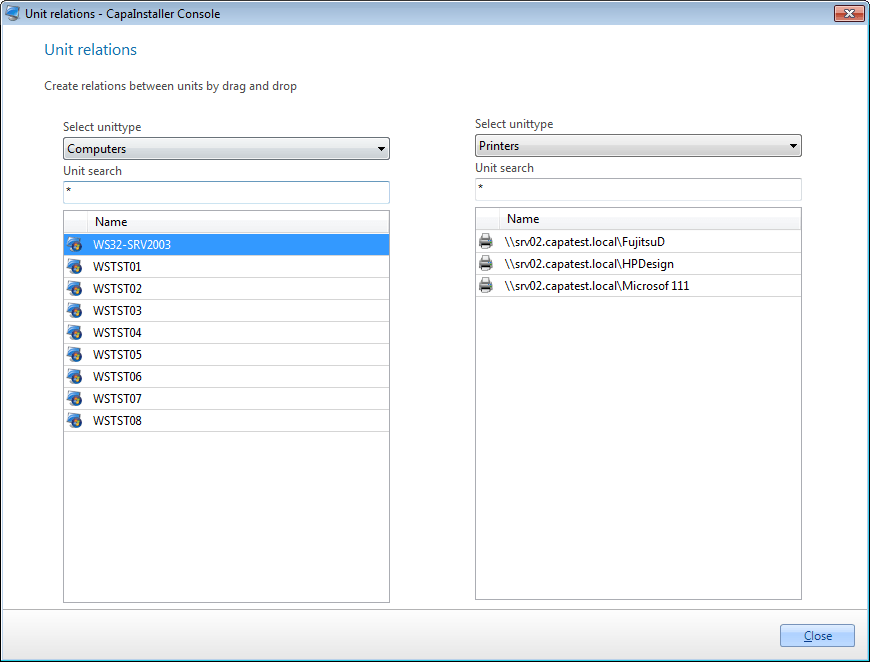 |
| Element | Description |
| Select unit type | The device of the unit relates to a unit. |
| Unit search | Search for the unit, use * as a wildcard. |
| Step | Action |
| 1 | Right-click on the unit you want to relate to another unit |
| 2 | Select the device type in the list.  |
| 3 | Search for the unit in the text box. Use * as a wildcard |
| 4 | Repeat the above for the unit to link to. |
| 5 | Select one or more units to relate to other units. |
| 6 | Now drag and drop the unit(s) from one side to the other, and drop on another unit. |