

Use Export in OS Deployment
Introduction
Section titled “Introduction”OSD allows you to export components to a portable zip format, and allow you to transfer these components to another installation.
Components such as points, servers and PXE servers can not be exported.
| Step | Action |
| 1 | You can begin exporting components by selecting Export… from the File menu or by right clicking the item you wish to export in the left hand side of the console and select Export… 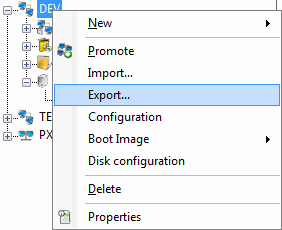 |
| 2 | Select the components you want to export 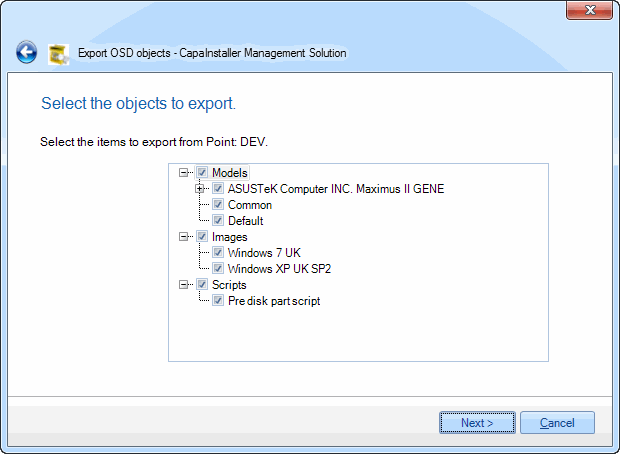 |
| 3 | Specify the destination zip archive to store the exported components in. 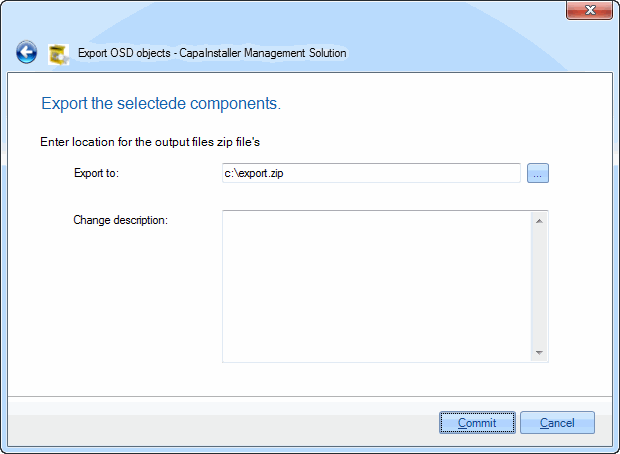 You can reuse zip archive however doing so may affect the performance of the export process. We therefore recommend creating new archives instead. You can reuse zip archive however doing so may affect the performance of the export process. We therefore recommend creating new archives instead. |
| 4 | Click Commit to begin exporting the selected components, this operation can take quite some time, depending on the size of the selected components. |