

Toolbar and menu description
The following is a description of the toolbar and menus in CIPC.
| File Menu | Shortcut | Description |
| New package | Ctrl + N | Create a new package |
| Open package | Ctrl + O | Loads a package definition previously saved in the database |
| Save package | Ctrl + S | Saves the current package definition in the database. Package name and version settings must be defined before the package can be saved. A new entry is created in the database if the definition has not been saved before or if the name and/or version is changed |
| Save package as | Saves the current package as a new project in the database | |
| Import package | Imports a package definition from an XML file | |
| Export package | Exports the current package definition to an XML file | |
| Exit | Exit CIPC |
Edit Menu
Section titled “Edit Menu”| Edit Menu | Shortcut | Description |
| Undo | Ctrl + Z | Undoes the most recent change |
| Cut | Ctrl + X | Removes the currently selected text, keeping a copy on the system clipboard |
| Copy | Ctrl + C | Copies the currently selected text to the system clipboard |
| Paste | Ctrl + V | Pastes the text currently in the system clipboard at the insertion point |
| Delete | Del | Deletes the currently selected text without copying it to the system clipboard |
| Select All | Ctrl + A | Selects all of the text in the currently active input field |
View Menu
Section titled “View Menu”| View Menu | Shortcut | Description |
| Show values | F2 | Show the current setting of a package. 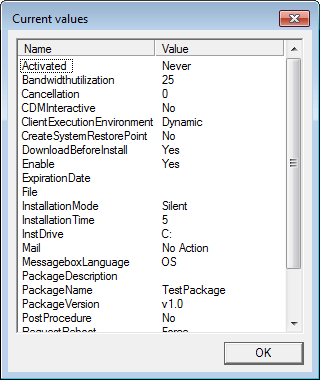 |
| Advanced view | This makes it possible for you to change the view of the tree. |
Tools Menu
Section titled “Tools Menu”| Tools Menu | Shortcut | Description |
| Generate | Ctrl + G | Use this option to generate the package and the desired scripts/programs etc. |
| Options | The program options control the general behavior of CIPC |
Help Menu
Section titled “Help Menu”| Help Menu | Shortcut | Description |
| Package creator help | F1 | Open this user guide |
| CapaSystems web | Opens the CapaSystems A/S website. | |
| About | Displays information about the current version, including licensing details and version number. |