

Deploy to reporting services
The following will guide you through the deployment to the report services process.
| Step | Action |
| 1 | File/Deploy to report services. |
| 2 | Select the Deploy item. Preview: Deploys the create report with the selected items and criteria Tree view selected node: Deploys the content in the content view for the selected treenode Software vendor report: Deploys the specified Software vendor report. Read more about Create Software vendor report 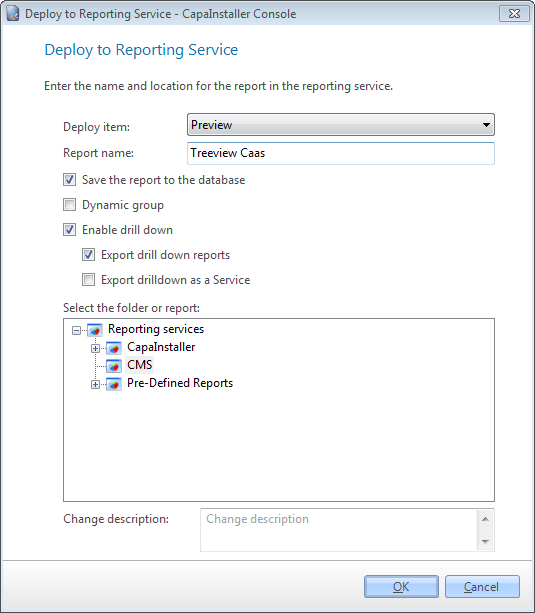 |
| 3 | Enter the name for the report. |
| 4 | If you have selected “Preview” as your Deploy item, you can choose to save the Report to the database and if it should be saved as a Dynamic group. |
| 5 | For Enable reporting services drill down, check the link Enable reporting services drill down |
| 6 | Select the folder for the report. |
| 7 | Click OK. |
| If you want to… | You can… |
| Create a custom made report | Create a report to see how. |
| Manage report services | Manage reporting services to see how. |
| Deploy predefined reports to reporting services | Deploy predefined reports to reporting services to see how. |