

WiFi Advanced Payload
Description
Section titled “Description”This payload can be used to configure a device to connect to a wireless access point with advanced authentication options.
If your organization uses more than one wireless access point, it can be beneficial to include more that one access point payload in a profile, e.g. Profile called “Global access points” which includes both public and enterprise access points payload in the same profile.
Depending on what type of access point you will configure, you should add a general Wifi access point and then jump to the configuration section that matches your setup for the access point:
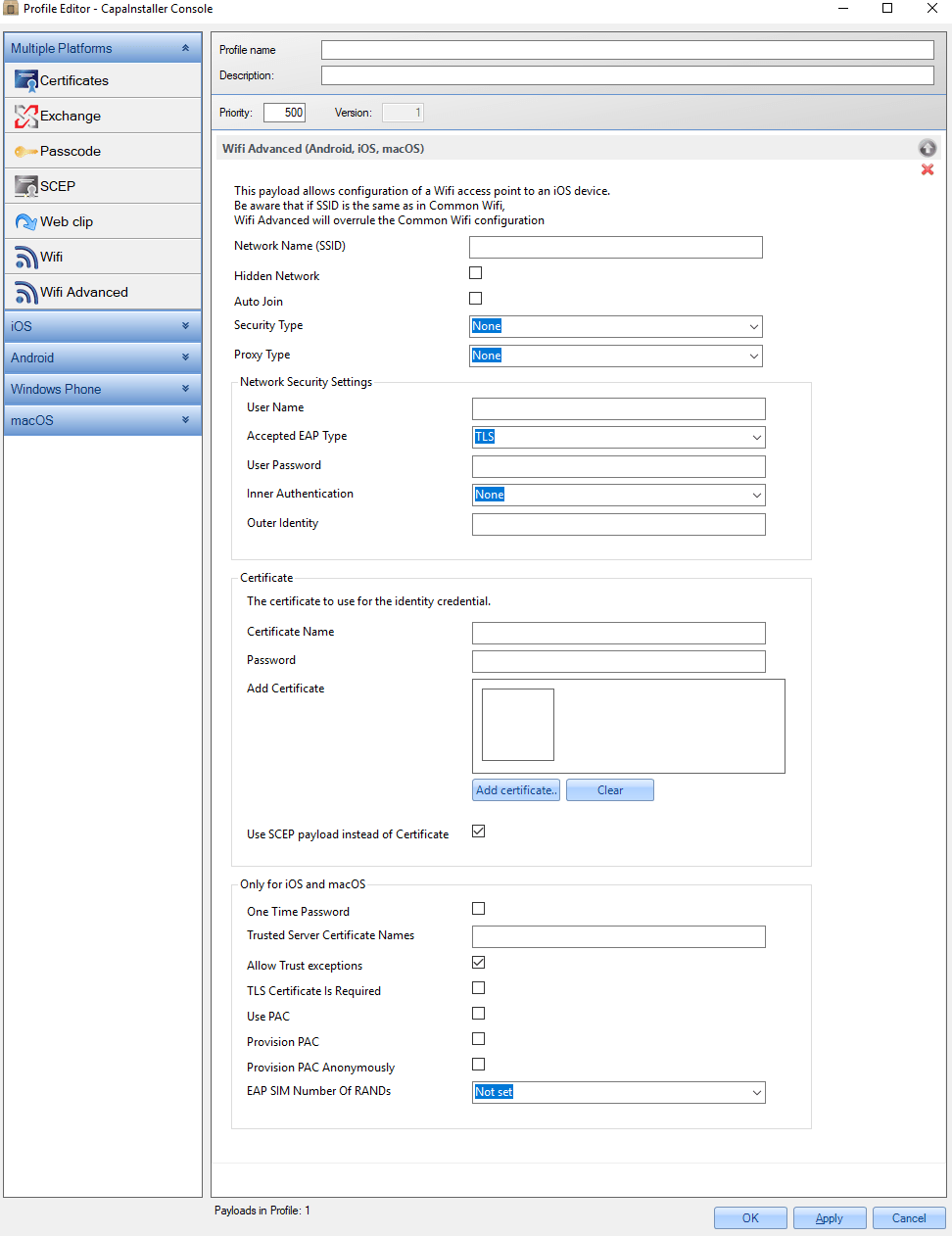
Configurations
Section titled “Configurations”| DISPLAY NAME | VALUES / RESTRICTIONS | DESCRIPTION | EXAMPLE |
|---|---|---|---|
| Network Name (SSID) | Identification (SSID) of the wireless network to connect to (Case sensitive). | CompanyWifi | |
| Hidden Network | True False (Default) | Enable if the target network is not open or broadcasting. | False |
| Auto Join | True False (Default) | Automatically join this wireless network | True |
| Security Type | Values: “None” (Default) [None],“WEP” [WEP],“Any-Personal” [Any], “WPA/WPA2 (Personal)” [WPA], “WPA/WPA2 (Enterprise)” [WPA], Yes both “WPA/WPA2 (Personal)” and “WPA/WPA2 (Enterprise)” is ending as “WPA” | Wireless network encryption to use when connecting | WPA/WPA2 (Enterprise) |
| Proxy Type | Values: “None” (Default), “ Manual“, “ Automatic“ | Configures proxy settings to be used with this network. | |
| NETWORK SECURITY SETTINGS | |||
| User Name | “WPA/WPA2 (Enterprise)” only | Username for connecting to the network. | WifiUser |
| Accepted EAP Types | Authentication protocols supported on the target network. | ||
| User Password | “WPA/WPA2 (Enterprise)” only | User password. If not provided, the user may be prompted during login. | |
| Inner Authentication | PAP CHAP MSCHAP MSCHAPv2 (Default) | Specifies the inner authentication used by the TTLS module. Possible values are PAP, CHAP, MSCHAP, MSCHAPv2, and EA. | MSCHAPv2 |
| Outer Identity | Externally visible identification (for use with TTLS, PEAP, and EAS-FAST). This allows the user to hide his or her identity. The user’s actual name appears only inside the encrypted tunnel. For example, it could be set to “anonymous” or “anon”, or “anon@mycompany.net”. It can increase security because an attacker can’t see the authenticating user’s name in the clear. |
||
| CERTIFICATE | |||
| Certificate Name | Name or description of the certificate credential. | [email protected] | |
| Password | The passphrase used to secure the credentials. | CertPassword | |
| Add Certificate | Certificate or Identity Data. X.509 certificate (.cer, .p12, etc) for inclusion on device. | ||
| Use SCEP payload instead of Certificate | Use a SCEP payload from this profile | Certificate | |
| ONLY FOR IOS OR macOS | |||
| One Time Password | True False (Default) | If true, the user will be prompted for a password each time they connect to the network. Defaults to false. | True |
| Trusted Server Certificate Names | This is the list of server certificate common names that will be accepted. You can use wildcards to specify the name, such as wpa.*.example.com. If a server presents a certificate that isn’t in this list, it won’t be trusted. Used alone or in combination with attached certificates, the property allows someone to carefully craft which certificates to trust for the given network, and avoids dynamically trusted certificates. Multiple entries must be split by a semicolon “”;“” |
[email protected] | |
| Allow trust exceptions | True (Default) False | Allows/disallows a dynamic trust decision by the user. The dynamic trust is the certificate dialogue that appears when a certificate isn’t trusted. If this is false, the authentication fails if the certificate isn’t already trusted. See attached certificates and ““Trusted Server Certificate Names”“. The default value of this property is true unless either Certificate is attached or ““Trusted Server Certificate Names”“ is supplied, in which case the default value is false. |
True |
| TLS Certificate Is Required | If true, allows for two-factor authentication for EAP-TTLS, PEAP, or EAP-FAST. If false, allows for zero-factor authentication for EAP-TLS. The default is true for EAP-TLS, and false for other EAP types. | ||
| Use PAC | True False (Default) | Use Protected Access Credential (PAC) | False |
| Provision PAC | True False (Default) | Used only if EAPFASTUsePAC is true. If set to true, allows PAC provisioning. Defaults to false. This value must be set to true for EAP-FAST PAC usage to succeed because there is no other way to provide a PAC. | False |
| Provision PAC anonymously | True False (Default) | If true provisions the device anonymously. Note that there are known man-in-the-middle attacks for anonymous provisioning. Defaults to false. | False |
| EAP SIM Number Of RANDs | A number of expected RANDs for EAPSIM. Valid values are 2 and 3. Defaults to 3. |