Templates
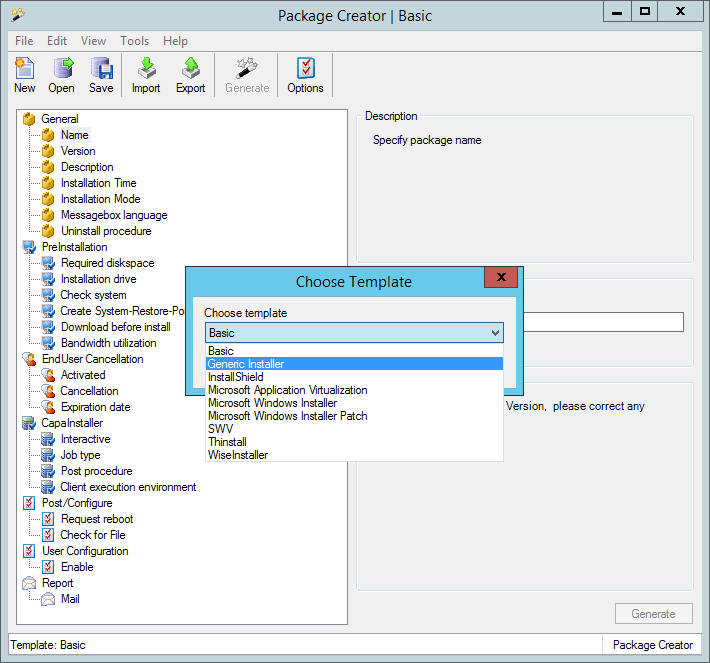
Various templates have been created making it possible to either create a package based on an application using Microsoft Windows Installer (MSI) or Install shield etc.
| Template | Description |
| Basic | The Basic template can be used to create an empty CapaInstaller script that is used for configuration, patching etc. The uninstall option is not available for a basic template |
| Generic Installer | The Generic template can be used to create a CapaInstaller script which is used to launch a generic setup.exe/install.exe with a pre-defined set of parameters |
| InstallShield | The InstallShield template can be used to create a CapaInstaller script which is used to launch an InstallShield setup.exe with a pre-defined set of parameters |
| Microsoft Windows Installer | The Microsoft Windows Installer template can be used to create a CapaInstaller script which is used to launch an MSI file. Options, log, install behavior can be defined from the tree view |
| Microsoft Windows Installer Patch | The Microsoft Windows Installer Patch template can be used to create a CapaInstaller script which is used to launch an MSP file. Options, log, install behavior can be defined from the tree view. |
| Microsoft Application Virtualization | The Microsoft Application Virtualization template can be used to deploy applications virtualized using Microsoft Application Virtualization. |
| SVS | The Software Virtualization Solution (SVS) template can be used to deploy the Virtual Software Archives |
| Thinstall | The Thinstall template can be used to deploy Thinstalled applications |
| WiseInstaller | The WiseInstaller template can be used to create a CapaInstaller script where the application setup is created using WiseInstaller |
When selecting ‘New package’ you will be prompted for which template to use. This last selected template will also be pre-selected when starting the Package Creator.
The template currently loaded will appear in the title bar and in the status bar.