

Process Software Group
Introduction
Section titled “Introduction”Right-click the Application groups folder under Software will show this context menu. Clicking on one of these process items will process the selected area.
| Step | Action |
| 1 | Click on the Software view. |
| 2 | Right-click on the Application groups folder, and click Process. 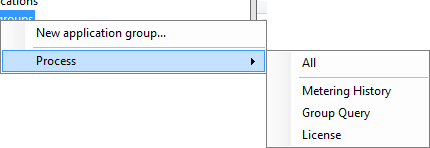 |
| 3 | Choose between All, Metering History, Group Query, or License. |
| Step | Action |
| All | Process all of the following process functions |
| Metering History | Process the data for Metering history view, license and license forecast |
| Group query | Process the Application group queries, which moves software to the specific application group |
| License | Process the Application group license and license forecast |