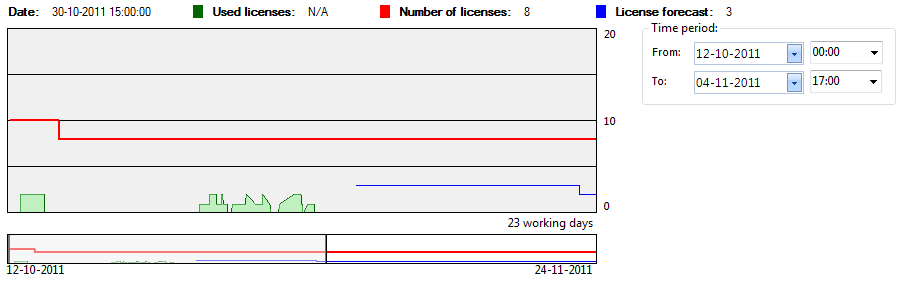
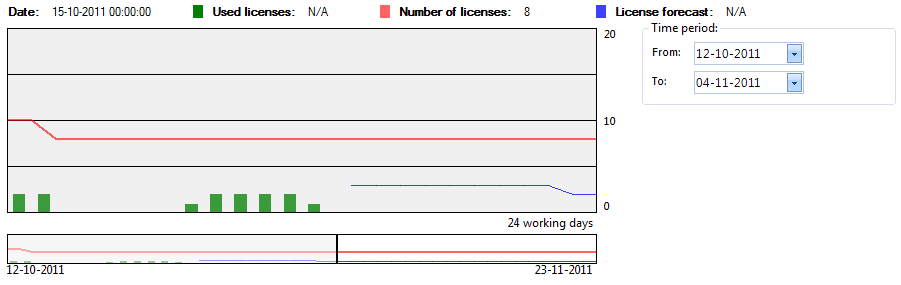
Metering history consists of two graph views, a detailed graph displays the use of the application per minute and a peak graph displaying the max use of the application per day. Both graphs contain a graph showing the number of licenses per minute or day.
|
|
| Graph |
Description |
| Used licenses |
Displaying the number of units using the one the applications in the application group pr. minute. |
| Number of licenses |
The number of licenses registered for the application group pr. day |
| License forecast |
The expected number of user applications in the future pr. day. If a lot of users have not used the software in a long time, there is a prediction that it is possible to uninstall the software on their computer |
|
|
| Step |
Action |
| 1 |
To zoom on the graph view, select a time period, use the mouse scroll wheel or make a selection on the lower graph with the right mouse button |
| 2 |
Zoom out by changing the time period or use the mouse scroll wheel |
|
|
| Graph |
Description |
| Used licenses |
Displaying the number of units using the one the applications in the application group pr. day. |
| Number of licenses |
The number of licenses registered for the application group pr. day |
| License forecast |
The expected number of user applications in the future pr. day. If a lot of users have not used the software in a long time, there is a prediction that it is possible to uninstall the software on their computer |
|
|
| Step |
Action |
| 1 |
To zoom on the graph view, select a time period, use the mouse scroll wheel or make a selection on the lower graph with the right mouse button |
| 2 |
Zoom out by changing the time period or use the mouse scroll wheel |

