

Change package status
The following is a description of how to change status on a package.
| Step | Action |
| 1 | Select the package in the navigation pane. On the right in the content view, a list of units to which the package is added will be shown. |
| 2 | Right-click a unit and select the status you wish to apply to the package. - Waiting - Installed - Failed - Schedule uninstallation 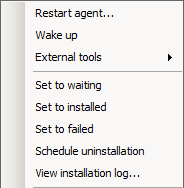 |
The menu item View Installation Log gives the option to view the package installation log if the package has been executed.
The log file will be uploaded to the database if the package has the status Installed, Failed or Cancelled.
If a package consists of more than one script e.g. if a Post Install Script is present it is only the latter that will be viewable from the Console.
To view previous scripts they can be found on the local computer in <Program Files>\CapaInstaller\Client\Logs.
Right-clicking a unit in the navigation pane also gives access to Restart agent and Restart user agent, which prompt the CapaInstaller Windows Agent to check for waiting packages immediately, in the computer and user context respectively, and Redeploy agent, which reinstalls the agent software on the unit. See Deploy the CapaInstaller Agent for details.