

Security Overview
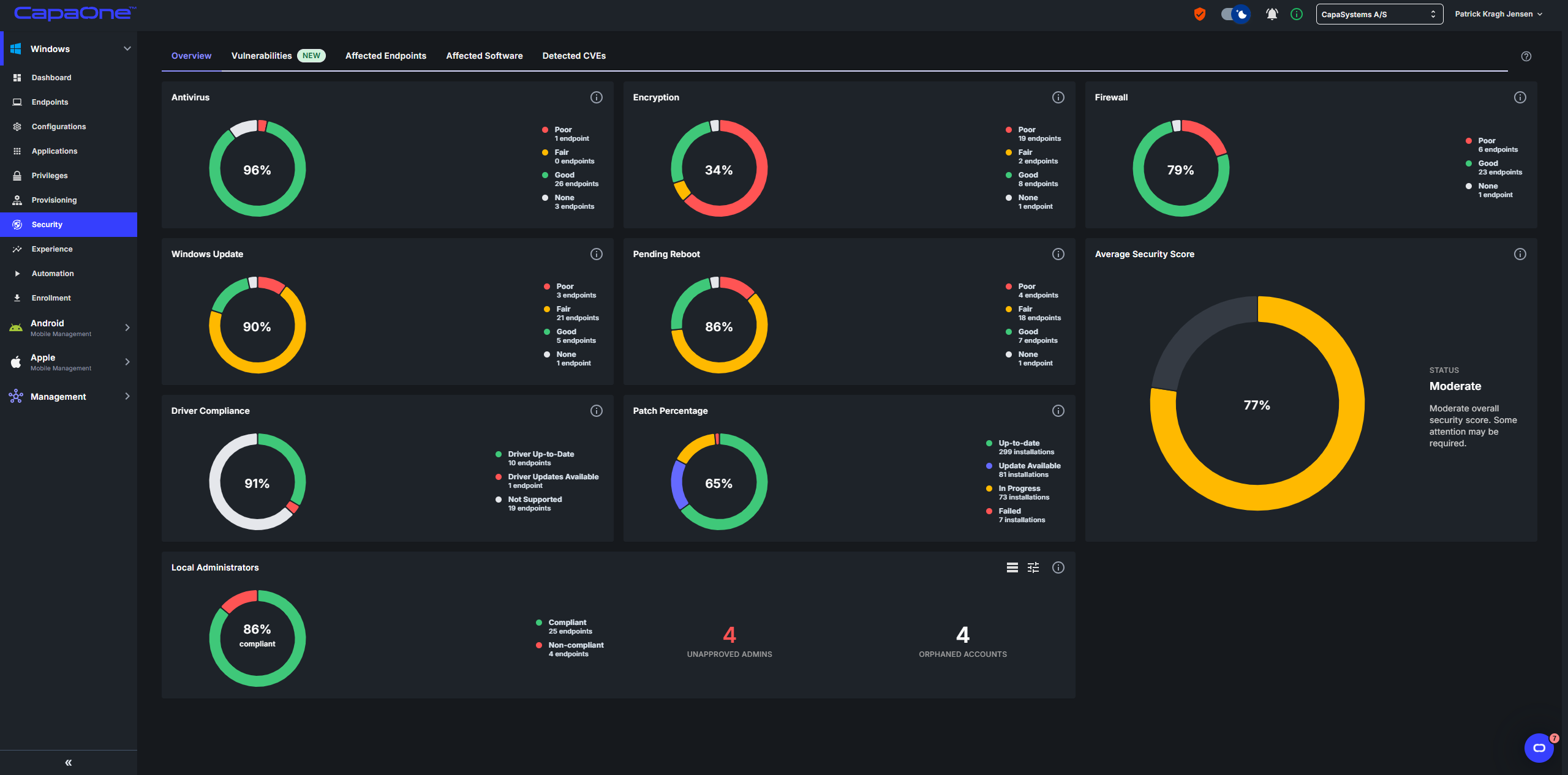
The Overview tab under Windows → Security shows the security configuration of all your Windows endpoints in one view. Each widget summarizes one area, so you can see where your fleet is weakest and open the endpoints that need attention.
For vulnerabilities and CVEs, use the other tabs on the same page. See Security Dashboard.
Security configuration widgets
Section titled “Security configuration widgets”The Antivirus, Encryption, Firewall, Windows Update, and Pending Reboot widgets show how many endpoints have each security score: Good, Fair, Poor, or None.
| Widget | What it shows |
|---|---|
| Antivirus | Endpoints with antivirus enabled and up to date. |
| Encryption | Endpoints encrypted with Microsoft BitLocker. |
| Firewall | Endpoints with the firewall enabled. |
| Windows Update | Endpoints fully updated with Windows patches. |
| Pending Reboot | Endpoints with a pending reboot. |
The percentage in the center of each chart is the share of Good and Fair endpoints out of all scored endpoints. Endpoints with None are left out of the calculation.
For how each score is decided, see Security Score Calculation.
Driver Compliance and Patch Percentage
Section titled “Driver Compliance and Patch Percentage”- Driver Compliance shows the percentage of endpoints with up-to-date drivers, out of all endpoints with supported hardware. Endpoints with unsupported hardware are left out.
- Patch Percentage shows the share of application patches that are up to date. Updates that are available, pending, in progress, or failed count as not up to date.
Average Security Score
Section titled “Average Security Score”Average Security Score is the average of the percentages in the Antivirus, Encryption, Firewall, Windows Update, Pending Reboot, Driver Compliance, and Patch Percentage widgets.
| Rating | Average score |
|---|---|
| Good | 90% and above |
| Moderate | 45% to 89% |
| Critical | Below 45% |
Local Administrators
Section titled “Local Administrators”The Local Administrators widget compares the local administrator accounts and groups on your endpoints with a list of administrators you’ve approved. It shows:
- The share of endpoints that are Compliant, meaning every local administrator on the endpoint is approved. Endpoints with no local administrators count as compliant.
- Unapproved admins: the number of local administrator memberships that aren’t on your approved list.
- Orphaned accounts: the number of accounts that hold local administrator rights but whose user no longer exists.
Select the table icon to list endpoints with their number of administrators, unapproved administrators, and orphaned accounts. Select the tune icon to manage the approved list. See Approve Local Administrators.
Drill down to endpoints
Section titled “Drill down to endpoints”Click a segment in a chart to open the list of endpoints in that segment. From the list, open an endpoint to see its security details. See Endpoint Security.
Select the expand icon on a widget to view it in a larger size.