

Legacy MDM to DDM Mapping
Use this reference to plan which Legacy configurations to recreate in DDM, and in which order. It lists every Legacy MDM payload, restriction, and command that Apple has deprecated or removed in OS 26 and OS 27, and the DDM configuration type in CapaOne that replaces it.
- Removed — the Legacy setting no longer functions on that OS version. Devices silently ignore it. Recreate it in DDM before devices update.
- Deprecated — the Legacy setting still works, but Apple has named a DDM replacement and can remove the Legacy setting in a future release. Plan to recreate it.
Priority 1: Removed in OS 27 — act before devices update
Section titled “Priority 1: Removed in OS 27 — act before devices update”These no longer function on iOS, iPadOS, and macOS 27. A device that updates with only the Legacy setting in place has no policy for it.
Software update commands
Section titled “Software update commands”| Legacy MDM command in CapaOne | Deprecated | Removed | Replace with |
|---|---|---|---|
Update OS request (Apple: ScheduleOSUpdate) |
26.0 | 27.0 (iOS, macOS, tvOS) | Software Update Enforcement Specific — see Enforce a Specific OS Update |
Available OS updates (AvailableOSUpdates) |
26.0 | 27.0 | DDM status: the device reports pending version and install state on its own |
OS update status (OSUpdateStatus) |
26.0 | 27.0 | DDM status: install state, pending version, failure reason |
Schedule OS update scan (ScheduleOSUpdateScan) — macOS |
26.0 | 27.0 | Not needed — DDM devices check for updates on their own |
The Update OS request is in Request on the device’s actions menu. See Apple Device Commands. CapaOne doesn’t show the other three as separate requests.
Software update restrictions
Section titled “Software update restrictions”| Legacy restriction (Apple key) | Platforms | Deprecated | Removed | Replace with (Software Update Settings) |
|---|---|---|---|---|
Delay software updates (forceDelayedSoftwareUpdates) |
iOS, macOS, tvOS | 26.0 | 27.0 | Deferrals (Combined, Major, Minor, and System Period) |
Software update delay in days (enforcedSoftwareUpdateDelay) |
iOS, macOS, tvOS | 26.0 | 27.0 | Deferrals → Combined Period (Days) (iOS), Deferrals → Minor Period (Days) (macOS) |
Delay major macOS updates (forceDelayedMajorSoftwareUpdates) |
macOS | 26.0 | 27.0 | Deferrals → Major Period (Days) |
Major macOS update delay (enforcedSoftwareUpdateMajorOSDeferredInstallDelay) |
macOS | 26.0 | 27.0 | Deferrals → Major Period (Days) |
Minor macOS update delay (enforcedSoftwareUpdateMinorOSDeferredInstallDelay) |
macOS | 26.0 | 27.0 | Deferrals → Minor Period (Days) |
Non-OS update delay (enforcedSoftwareUpdateNonOSDeferredInstallDelay) |
macOS | 26.0 | 27.0 | Deferrals → System Period (Days) |
Delay app updates (forceDelayedAppSoftwareUpdates) |
macOS | 26.0 | 27.0 | No direct DDM equivalent |
Allow Rapid Security Response installation (allowRapidSecurityResponseInstallation) |
iOS, macOS | 26.0 | 27.0 | Rapid Security Response → Enable |
Allow Rapid Security Response removal (allowRapidSecurityResponseRemoval) |
iOS, macOS | 26.0 | 27.0 | Rapid Security Response → Enable Rollback |
Recommended cadence — Settings command, SoftwareUpdateSettings → RecommendationCadence (supervised) |
iOS | 26.0 | 27.0 | Recommended Cadence |
See Software Update Settings for each DDM setting.
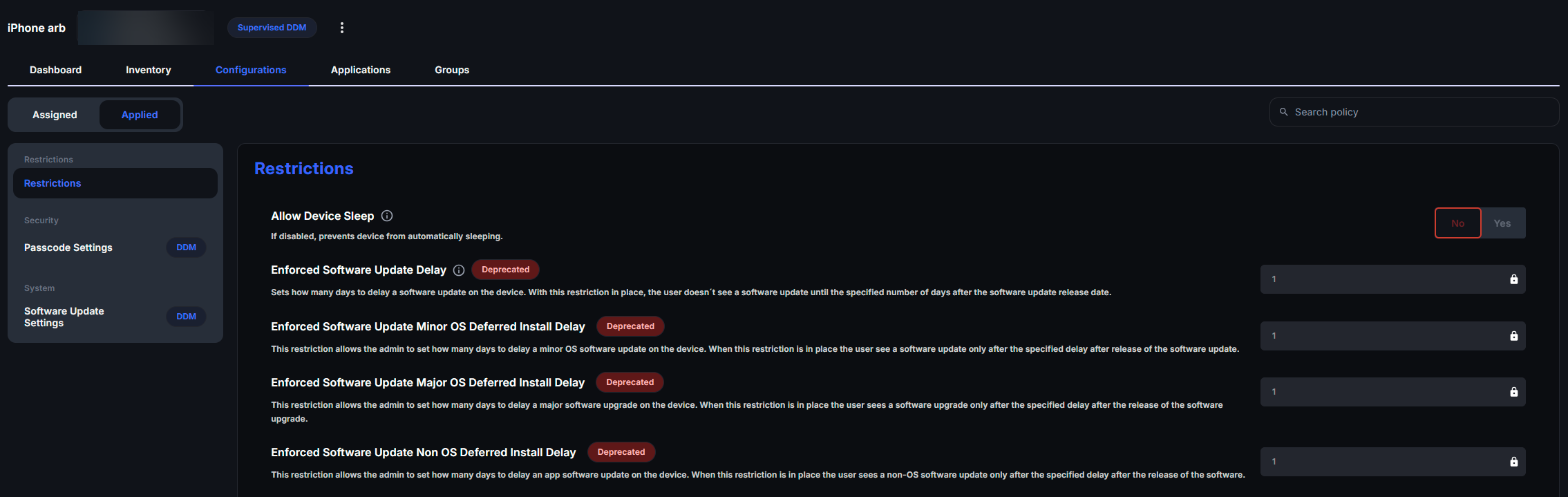
CapaOne marks these Legacy settings with a Deprecated badge. On a device’s Configurations tab, under Applied, a Legacy software update restriction that a device on OS 27 ignores is still listed with the badge — there’s no error.
Priority 2: Deprecated in OS 27 — recreate during your migration
Section titled “Priority 2: Deprecated in OS 27 — recreate during your migration”Profile payloads
Section titled “Profile payloads”| Legacy payload | Platforms | Deprecated | Replace with in CapaOne DDM | Notes |
|---|---|---|---|---|
Passcode (com.apple.mobiledevice.passwordpolicy) |
iOS, macOS, watchOS, visionOS | 27.0 | Passcode Settings | See DDM Passcode Settings. |
DNS Settings (com.apple.dnsSettings.managed) |
iOS, macOS, visionOS | 27.0 | Network DNS Settings | DDM type requires OS 27. |
DNS Proxy (com.apple.dnsProxy.managed) |
iOS, macOS, visionOS | 27.0 | Network DNS Proxy | DDM type requires OS 27. |
Restrictions
Section titled “Restrictions”| Legacy restriction (Apple key) | Platforms | Deprecated | Replace with in CapaOne DDM |
|---|---|---|---|
Allowed apps list (allowListedAppBundleIDs) |
iOS, tvOS, visionOS | 27.0 | App Settings → Allowed apps |
Blocked apps list (blockedAppBundleIDs) |
iOS, tvOS, visionOS | 27.0 | App Settings → Denied apps |
Allow Siri AI (allowSiriAI) |
iOS | 27.0 | Not available in CapaOne — neither as a DDM type nor in the Legacy Restrictions editor. Use a Custom Configuration profile if you need it. |
Priority 3: Deprecated in OS 26.4 — Apple Intelligence, Siri and keyboard restrictions
Section titled “Priority 3: Deprecated in OS 26.4 — Apple Intelligence, Siri and keyboard restrictions”Apple moved these restrictions out of the Legacy Restrictions payload into dedicated DDM types in iOS, iPadOS and macOS 26.4. All the DDM replacements require Supervised devices. In CapaOne’s Legacy Restrictions editor, these restrictions carry a Deprecated badge.
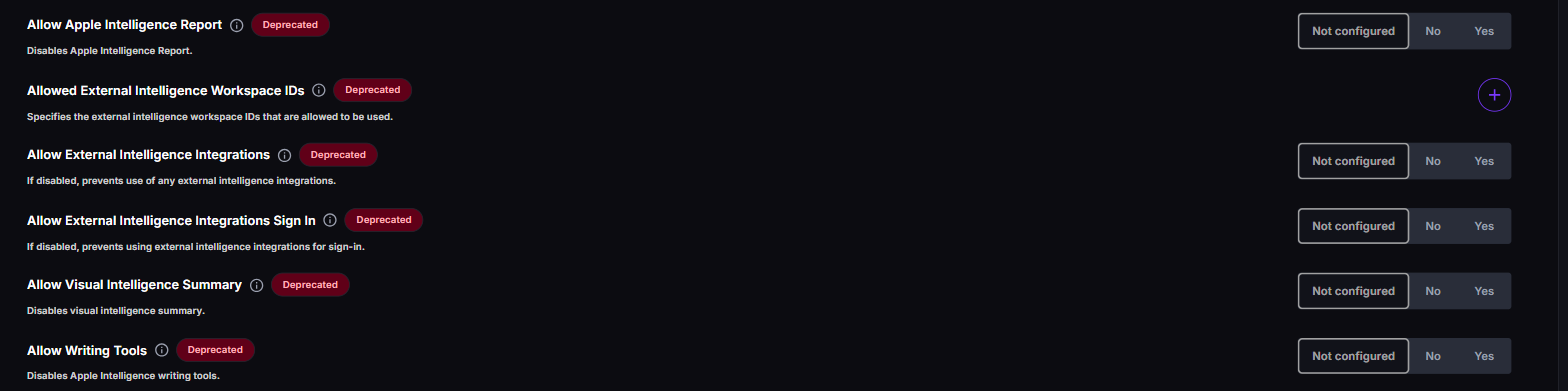
Some of the restrictions below aren’t in CapaOne’s Legacy Restrictions editor at all. For those, the table says so — use a Custom Configuration profile if you need them.
| Legacy restriction (Apple key) | Replace with in CapaOne DDM |
|---|---|
allowAssistant (Siri) |
Siri Settings → Enabled |
allowAssistantWhileLocked |
Siri Settings → Allow While Locked |
allowAssistantUserGeneratedContent |
Siri Settings → Allow User-Generated Content |
forceAssistantProfanityFilter |
Siri Settings → Force Profanity Filter |
allowWritingTools |
Intelligence Settings → Allow Writing Tools |
allowGenmoji |
Intelligence Settings → Allow Genmoji (not in CapaOne’s Legacy Restrictions editor) |
allowImagePlayground |
Intelligence Settings → Allow Image Playground (not in CapaOne’s Legacy Restrictions editor) |
allowImageWand |
Not available in CapaOne — neither as a DDM type nor in the Legacy Restrictions editor. Use a Custom Configuration profile. |
allowPersonalizedHandwritingResults |
Not available in CapaOne — neither as a DDM type nor in the Legacy Restrictions editor. Use a Custom Configuration profile. |
allowMailSummary, allowMailSmartReplies |
Not available in CapaOne — neither as a DDM type nor in the Legacy Restrictions editor. Use a Custom Configuration profile. |
allowSafariSummary |
Not available in CapaOne — neither as a DDM type nor in the Legacy Restrictions editor. Use a Custom Configuration profile. |
allowNotesTranscription, allowNotesTranscriptionSummary |
Not available in CapaOne — neither as a DDM type nor in the Legacy Restrictions editor. Use a Custom Configuration profile. |
allowAppleIntelligenceReport |
Not available in CapaOne DDM. Keep the Legacy restriction. |
allowVisualIntelligenceSummary |
Not available in CapaOne DDM. Keep the Legacy restriction. |
forceOnDeviceOnlyDictation |
Not available in CapaOne DDM. Keep the Legacy restriction. |
forceOnDeviceOnlyTranslation |
Not available in CapaOne DDM. Keep the Legacy restriction. |
allowExternalIntelligenceIntegrations |
External Intelligence Settings → Allow External Intelligence |
allowExternalIntelligenceIntegrationsSignIn |
Not available in CapaOne DDM. Keep the Legacy restriction. |
allowedExternalIntelligenceWorkspaceIDs |
Not available in CapaOne DDM. Keep the Legacy restriction. |
allowAutoCorrection |
Keyboard Settings → Auto-Correct |
allowSpellCheck |
Keyboard Settings → Allow Spell Checking |
allowPredictiveKeyboard |
Keyboard Settings → Allow Predictive Text |
allowContinuousPathKeyboard |
Keyboard Settings → Allow Slide to Type |
allowDefinitionLookup |
Not available in CapaOne DDM. Keep the Legacy restriction. |
allowDictation |
Keyboard Settings → Allow Dictation |
allowKeyboardShortcuts |
Keyboard Settings → Allow Text Replacement |
See Apple Intelligence, Siri and External AI Controls.
Has a DDM equivalent, but Legacy isn’t deprecated
Section titled “Has a DDM equivalent, but Legacy isn’t deprecated”These Legacy payloads keep working. Move them to DDM when it’s convenient — for example to benefit from status reporting — not because you have to.
| Legacy configuration type | DDM type in CapaOne | DDM minimum version |
|---|---|---|
| Mail → Exchange ActiveSync | Account Exchange | iOS 15 / macOS 13 |
| Accounts → LDAP | Account LDAP | iOS 15 / macOS 13 |
| Certificates → PEM Certificate, PKCS1 Certificate, Root Certificate | Security Certificate + Asset Credential Certificate | iOS 17 / macOS 14 |
| Certificates → PKCS12 Certificate, SCEP | Security Identity + Asset Credential Identity / SCEP | iOS 17 / macOS 14 |
| VPN → VPN | Network VPN IKEv2 / IPSec / Plugin / Always On | OS 27 |
| Web → Web Content Filter | Web Content Filter Plugin | OS 27 |
| User Experience → Home Screen Layout | Home Screen Layout (delivered as a legacy profile declaration) | iOS 15 |
No DDM equivalent yet — stay on Legacy
Section titled “No DDM equivalent yet — stay on Legacy”Keep these as Legacy configurations. They work on a device that runs DDM.
- Networking → Wifi
- Networking → Cellular
- Networking → Domains
- Networking → Network Usage Rules
- Restrictions not listed above (for example camera, AirDrop, screenshots, App Store, iCloud, managed Open In)
- App Management → Kiosk Mode
- VPN → App Layer VPN
- User Experience → Notifications and Wallpaper
- System Configuration → Lock Screen Message
- Custom → Custom Configuration
Good to know
Section titled “Good to know”- Removed means silent — a removed Legacy setting doesn’t produce an error in CapaOne or on the device. Audit before the update; see Audit devices before upgrading.
- Deprecated isn’t urgent, but plan for it — the software update settings Apple deprecated in OS 26 stopped functioning one release later, in OS 27. Plan as if the OS 27 deprecations could follow the same pattern.
- Legacy and DDM can apply the same setting at the same time — the device merges them and enforces the strictest value. That’s safe during migration, but remove the Legacy setting afterwards to avoid confusion.
- A Legacy profile can be bridged into DDM — Apple’s legacy profile declaration can deliver a Legacy profile through DDM, and can take over a profile Legacy MDM already installed. See How DDM Works.
- Source: Apple’s device management schema (
mdm/profiles,mdm/commands, Release v27.0) and Apple’s iOS 27 enterprise release notes.