

The CapaOne Platform
The CapaOne home page is your starting point for everything in the platform. From here you reach endpoint management for Windows, Android, and Apple, your account and organization settings, and support resources.
You land on the home page when you sign in to dash.capaone.com. To return to it from anywhere, click the CapaOne logo in the top bar.
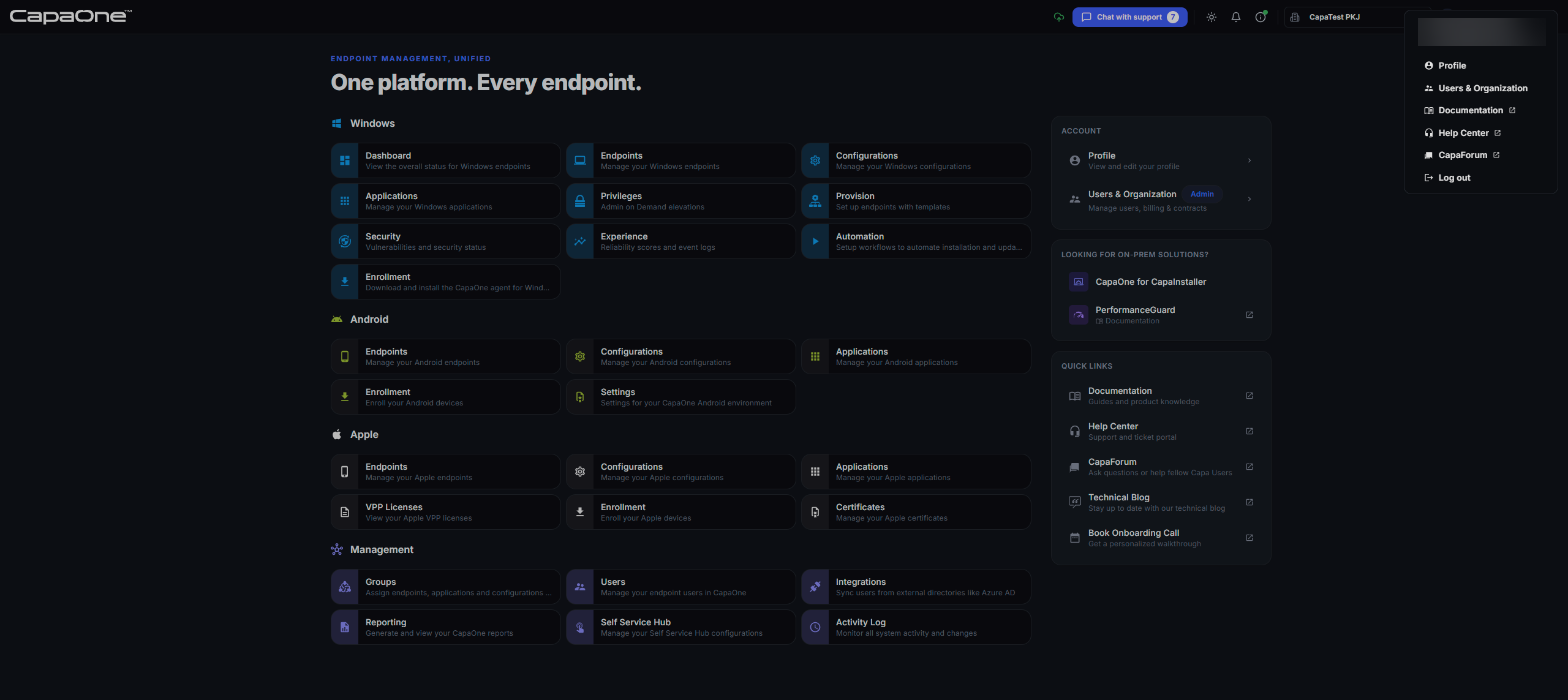
The left side of the home page shows a tile for each area, grouped by platform. Click a tile to go to that area. You see only the tiles your organization’s contracts include. See Roles and Product Access.
Windows
Section titled “Windows”| Tile | What you do there |
|---|---|
| Dashboard | See the overall status of your Windows endpoints. See Windows Dashboard. |
| Endpoints | Manage your Windows endpoints. See Windows Endpoint List. |
| Configurations | Manage Windows configurations. See Windows Configurations. |
| Applications | Deploy and manage Windows applications. See Application Manager. |
| Privileges | Handle Admin on Demand elevations. See Privilege Manager. |
| Provision | Set up endpoints with templates. See Provision Manager. |
| Security | Review vulnerabilities and security status. See Security Monitor. |
| Experience | Review reliability scores and event logs. See Experience Monitor. |
| Automation | Set up workflows that automate installations and updates. See Automation. |
| Enrollment | Download and install the CapaOne agent. See Windows Enrollment. |
Android
Section titled “Android”| Tile | What you do there |
|---|---|
| Endpoints | Manage your Android endpoints. See Android Endpoints. |
| Configurations | Manage Android configurations. See Android Configurations. |
| Applications | Manage Android applications. See Android Applications. |
| Enrollment | Enroll Android devices. See Android Enrollment. |
| Settings | Set up Android Enterprise for your organization. See Android Enterprise Setup. |
| Tile | What you do there |
|---|---|
| Endpoints | Manage your iOS, iPadOS, and macOS endpoints. See Apple Endpoints Overview. |
| Configurations | Manage Apple configurations. See Apple MDM Configuration Types. |
| Applications | Manage Apple applications. See Apple Applications. |
| VPP Licenses | Track your Apple VPP licenses. See Apple VPP License Tracking. |
| Enrollment | Enroll Apple devices. See Apple Enrollment. |
| Certificates | Upload and renew your Apple push certificate and tokens. See Apple Push Certificate Setup. |
Management
Section titled “Management”These areas apply across all platforms.
| Tile | What you do there |
|---|---|
| Groups | Assign endpoints, applications, and configurations to groups. See Managing Groups. |
| Users | Manage your endpoint users. See Managing Users. |
| Integrations | Sync users from external directories such as Microsoft Entra ID. See Integrations. |
| Reporting | Generate and view CapaOne reports. See Reporting. |
| Self Service Hub | Manage your Self Service Hub settings. See Self Service Hub. |
| Activity Log | Monitor all activity and changes in your organization. See Activity Log. |
Account, on-prem, and quick links panels
Section titled “Account, on-prem, and quick links panels”The right side of the home page has three panels:
- Account — open your Profile, or Users & Organization to manage sub-organizations, users, billing, licenses, and contracts. Users & Organization requires the Manager role. See Accessing account administration inside CapaOne.
- Looking for On-Prem Solutions? — open CapaOne for CapaInstaller or the PerformanceGuard documentation.
- Quick Links — open the documentation, the Help Center, CapaForum, the technical blog, or book an onboarding call.
See On-prem solutions and Quick links.
Next steps
Section titled “Next steps”To learn how to sign in, use the top bar and sidebar, and switch between organizations, see Navigating CapaOne.