

Apple Re-enrollment — Clean Install
Re-enrolling device without existing apps and configurations
Section titled “Re-enrolling device without existing apps and configurations”- Find the iPad/iPhone in Capaone.com
- go to the device page,
- click on the three dots. and select Request-> Wipe
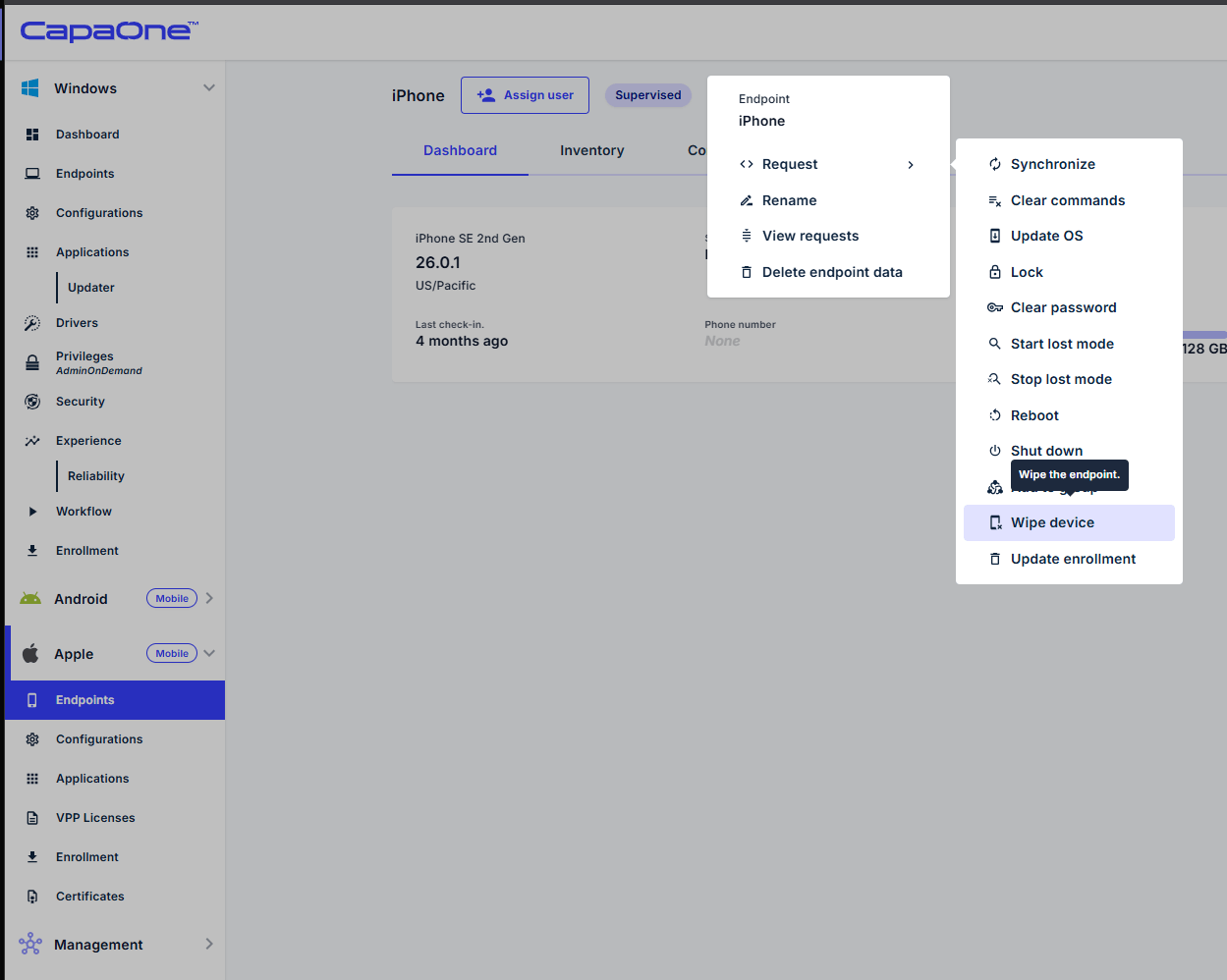
After this the device will reset to factory settings and is ready to be enrolled again. When the Device is enrolled again it will be a clean install.
If the device certificate is broken
Section titled “If the device certificate is broken”A device whose MDM certificate has broken or expired can no longer receive the remote Wipe command, so the procedure above never completes. A common symptom is DEP re-enrollment that hangs at the Entra ID sign-in step. Erase the device by hand instead:
- Find the device in Dash.capaone.com and open its device page.
- Click the three dots and select Delete endpoint data. This removes the endpoint record in CapaOne without needing a working connection to the device.
- On the device itself, go to Settings → General → Transfer or Reset iPhone/iPad → Erase All Content and Settings.
- Enroll the device through DEP as usual. See Apple Enrollment.
The device now appears in CapaOne as a newly enrolled endpoint.
If you hit this certificate error across many devices at once, the cause is more likely an Apple Business Manager or DEP token problem than a fault on each device. See Apple DEP Integration.
Related
Section titled “Related”- Apple Re-enrollment — Keep Profiles and Apps — re-enroll while keeping groups, apps, and configurations
- Apple Enrollment — enroll an Apple device from scratch
- Apple DEP Integration — connect Apple Business Manager and renew the DEP token
- Apple Endpoints Overview — find a device and its available actions
- Integrate CapaOne with Entra ID — the sign-in step DEP enrollment depends on