

Driver Installer Configuration
A driver installer configuration controls what happens on the endpoint when CapaOne installs driver updates: whether the end user is asked first, and the text of the messages they see.
Create a driver installer configuration
Section titled “Create a driver installer configuration”- Go to Windows → Configurations and click New.
- If you’re asked for a configuration type, select the driver installer type.
- Enter a name for the configuration.
- Under Installation Mode, fill in the settings described in Settings.
- Click Create.
- Assign the configuration to endpoints or groups on its Assignment tab.
The configuration appears on the DriverInstaller tab of the configuration list. If an endpoint has more than one driver installer configuration, the one with the highest priority applies.
Settings
Section titled “Settings”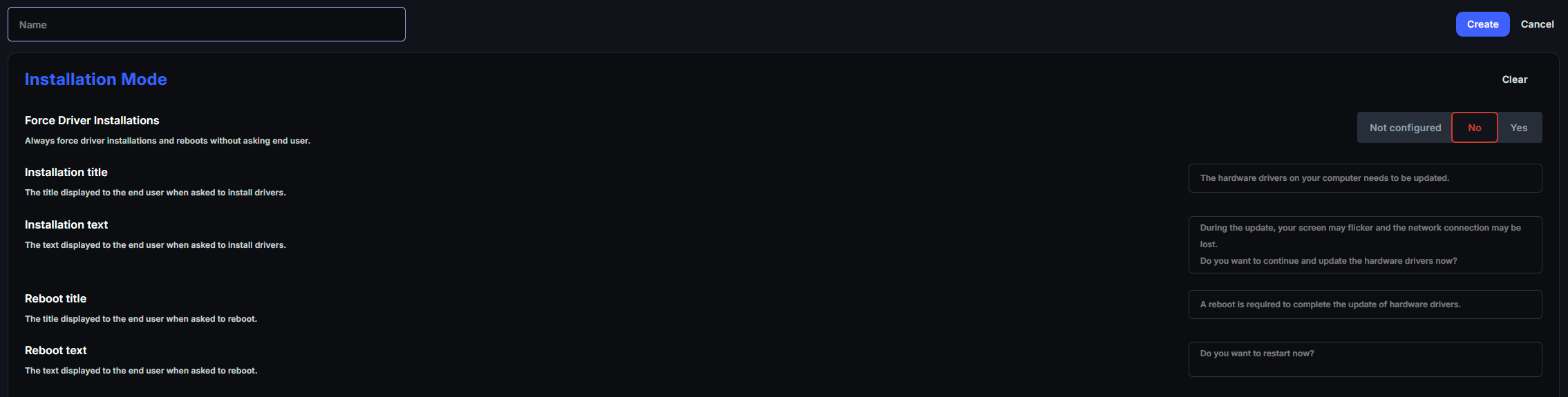
| Setting | Description |
|---|---|
| Force Driver Installations | Always install drivers and restart the endpoint without asking the end user. Off by default. |
| Installation title | The title of the message that asks the end user to install drivers. |
| Installation text | The text of the message that asks the end user to install drivers. |
| Reboot title | The title of the message that asks the end user to restart. |
| Reboot text | The text of the message that asks the end user to restart. |
If you leave a text field empty, the end user sees the default text. The default texts are the placeholders shown in the fields, for example “The hardware drivers on your computer needs to be updated.”
What the end user sees
Section titled “What the end user sees”When Force Driver Installations is off:
- The CapaOne Agent downloads the drivers.
- A message asks the end user whether to install the drivers now. The message waits for up to one hour.
- If the end user answers No, or doesn’t answer within an hour, the drivers aren’t installed and the update fails with a status that says it was canceled by the user or by timeout. The update also fails if no user is signed in to answer.
- If a driver needs a restart, a second message asks the end user whether to restart now. If they decline, they’re asked again after 60 minutes.
When Force Driver Installations is on, the drivers are installed without asking, and the endpoint restarts automatically if a driver needs it.