

Provisioning Points
A provisioning point is a managed Windows endpoint running a temporary PXE server, so other devices on its subnet can network-boot into the CapaOne provisioning environment. Any online managed endpoint can take the role — no dedicated server is needed.
Provisioning points are managed under Windows → Provisioning → Provisioning Points.
Start a PXE server
Section titled “Start a PXE server”- Navigate to Windows → Provisioning → Provisioning Points.
- Click New and select Start New PXE Server.
- Select an online device. Use the search field to filter by endpoint name.
- Optional: check Always On to keep the PXE server running until you stop it.
- Click Start PXE.
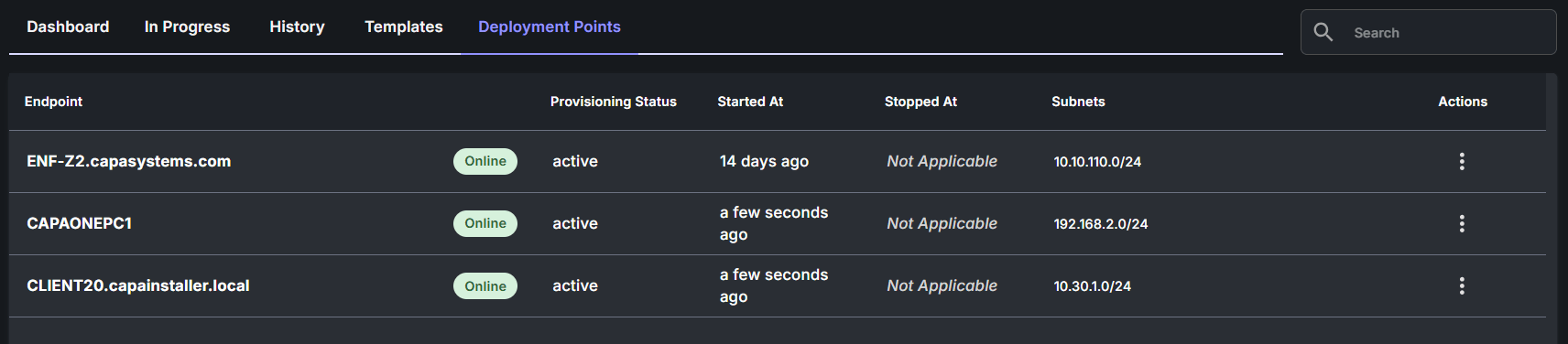
The endpoint appears in the list with PXE Server status Active shortly after.
By default, the PXE server stops automatically after 30 minutes. With Always On, it runs until you stop it.
You can also start the PXE server from the endpoint itself: open the device in the Endpoints list and select the Start PXE (30 mins) action.
Manage a provisioning point
Section titled “Manage a provisioning point”Open the actions menu on a row to manage it:
| Action | Effect |
|---|---|
| Start PXE (30 mins) | Starts the PXE server. It stops automatically after 30 minutes. |
| Start PXE (Always On) | Starts the PXE server and keeps it running until stopped. |
| Stop PXE | Stops the PXE server on the endpoint. |
| Clear From List | Removes the endpoint from the list. Only inactive provisioning points can be cleared. |
Reading the list
Section titled “Reading the list”| Column | Meaning |
|---|---|
| Endpoint | The managed device running the PXE server. Links to the device dashboard. |
| PXE Server | Active (serving PXE boot requests) or Inactive. |
| Started / Stopped | When the PXE server was last started and stopped. |
| Subnets | The subnets the endpoint is connected to — the subnets where devices can PXE-boot from this point. |