# Agent Doesn't Report Properly
> Fix an agent that does not report CPU, memory, or a particular Windows performance counter.
Source: https://docs.capaone.com/performanceguard/troubleshooting/troubleshoot-agent/agent-doesn-t-report-properly/
Product: PerformanceGuard — a separate CapaSystems product; do not apply this page to any other.
Symptom: Why doesn't the PerformanceGuard Agent report information on CPU, memory or a Windows Performance Counter?
## **Possible Causes**
The PerformanceGuard agent is able to collect information from any Windows Performance Counter object. The list of available counters on a specific computer is gathered from the registry database on the computer from the following key:
Open Windows' Registry Editor (click **Start**, type regedit and press ENTER) and expand the key HKEY\_LOCAL\_MACHINE\SOFTWARE\Micorsoft\Windows NT\CurrentVersion\Perflib\009.
Under this key will be one string value and two multi string values:
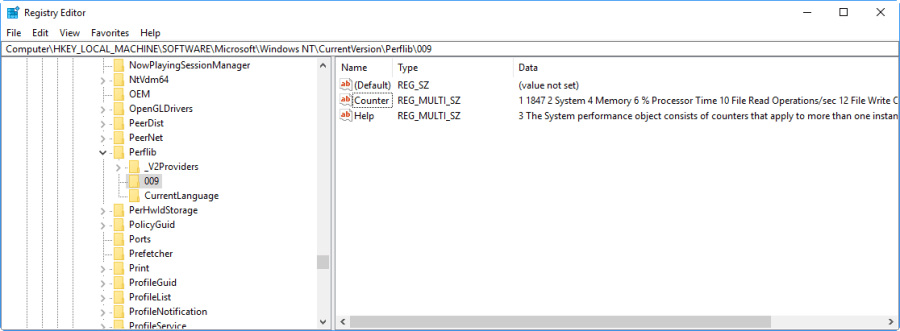
The key is unusual in the sense that you cannot modify the key. The key is unlike most other keys only mapped in memory of the computer at this stage.
Due to a bug in Windows, this particular registry key can occasionally be empty and thus the PerformanceGuard Agent will not be able to gather information on available Windows Performance Counters, resulting in no data being collected by the agent.
:::note[Important]
Why and When does this happen?
It is difficult to tell exactly why this happens. For now only one scenario has been proved to be able to regenerate this situation and that is if Windows is not shut down gracefully, e.g. caused by a loss of power then the registry key will be completely empty. If the server is restarted gracefully, the registry key is again available and the PerformanceGuard Agent can start collecting data again.
:::
## **Solution**
**What can be done to prevent this?**
Fortunately a workaround has been found for this situation.
If you are in the above described situation then you can stop this problem from happening again by simply deleting the '009' key before restarting the computer.
:::caution
You can only delete the key if there are no values under the key.
:::
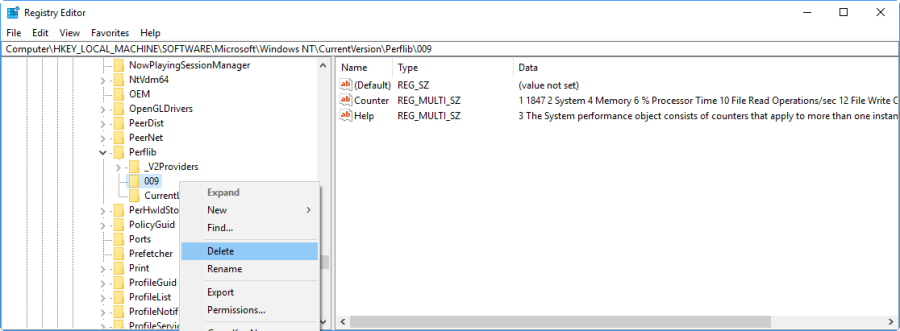
This has been found to stop the key from being initiated during computer start-up, even when the server has suffered from a hard crash.