# iOS 13 / iPadOS 13: Profile Must Be Installed Interactively
> Fix the profile must be installed interactively error during initial setup of an iOS 13 or iPadOS 13 device.
Source: https://docs.capaone.com/capainstaller/troubleshooting/ios-13-ipados-13-profile-must-be-installed-interactively/
Product: CapaInstaller — a separate CapaSystems product; do not apply this page to any other.
## **Problem**
During the initial setup of a new iOS / iPad, an error is displayed stating that the profile must be installed interactive.
| | |
|:-----------------------------------------------------------------------------------------------------------------------------------------------------------------------------------------------------------------------------------------------------------------------------------------------------|:----------------------------------------------------------------------|
| On a DEP'ed iOS device, during the activation process,
the error:
Installation of profile failed. "com.capasystems.profile must
be installedinteractively" appears.
When you reboot the device, the same error appears again
and the device is stuck in a loop. | 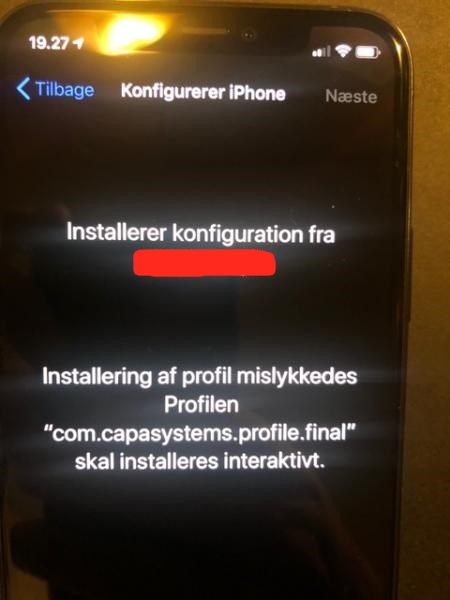 |
## **Cause**
This error comes on iOS 13.x and iPad OS 13.x when a system update is ongoing. For some reason, the profile cannot be installed when the system is about to be updated.
## **Workaround**
You need to wipe the device and in some cases even download the OS again.
During the initial setup, **answer no to update automatically**. If you have a device with this error, it will properly get stuck in this state and you will have to wipe it an start all over.
You can also skip it in the DEP profile.
:::tip
Check these guide from Apple:
R[estore your iOS or iPadOS device in iTunes on PC](https://support.apple.com/guide/itunes/restore-to-factory-settings-itnsdb1fe305/windows)
[Restore your iOS device in iTunes on Mac](https://support.apple.com/guide/itunes/restore-to-factory-settings-itnsdb1fe305/mac)
:::