# Deploy OS Deployment Service
> Deploy the OS Deployment Service.
Source: https://docs.capaone.com/capainstaller/the-capainstaller-console/system-administration/what-is-system-administration/services/os-deployment-service/deploy-os-deployment-service/
Product: CapaInstaller — a separate CapaSystems product; do not apply this page to any other.
# Introduction
This guide describes the steps involved in deploying the OSDeployment service
Installation of the OSdeployment service is simple and follows the same principles for all new services introduced or updated in CapaInstaller 5 and above.
### Guide
To deploy the OSDeployment service. Right-click *OS Deployment Services* in the left-hand service tree and select Deploy.

:::caution
- Default TFTP Settings are compatible with most devices. In case of very slow or failed transfers, check your NIC vendor documentation for supported TFTP transfer Window / Block sizes. Read more about transfer settings here: [Network Boot Profiles](/capainstaller/the-capainstaller-console/os-deployment/how-to-use-osd/network-boot-profiles/)
- Our Recommended settings to the TFTP Demon is
Default Window Size 8
Default Block Size 1456
- If you are upgrading from an earlier version of CapaInstaller the old ciboot service be shut down automatically and OSDeployment will replace it.
:::
### OS Deployment Service configuration options
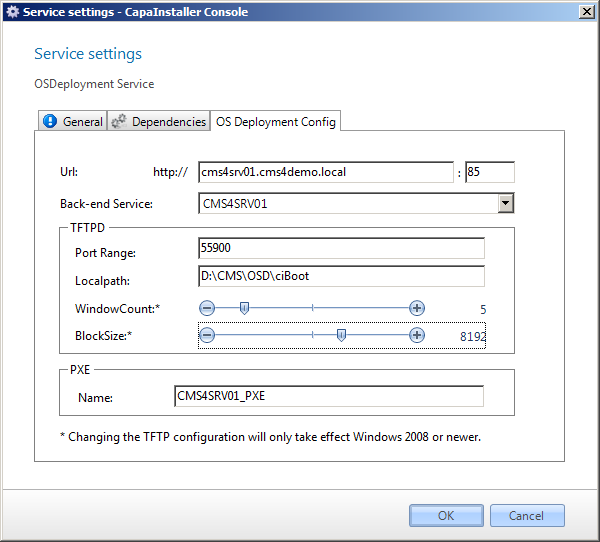
Configuration settings for the OS Deployment service...
| | |
|:-----------------|:------------------------------------------------------------------------------|
| **Element** | **Description** |
| URL and port | This URL is used to communicate with the service. |
| Back-end Service | The back-end service used to communicate with the CapaInstaller solution |
| TFTPD Port Range | The port range used with TFTPD |
| TFTPD Local path | The Local path for the TFTPD |
| WindowCount\* | Is the amount of blocks sent before we expect an acknowledge from the client. |
| BlocjSize\* | Is the size of the blocks sent from the service to the client. |
| PXE Name | The name of the PXE Servers to be linked to. |
| | |
|:------------|:---------------------------------------------------------------------------------------|
| **Element** | **Description** |
| OK | Clicking this button commits any changes that you may have made and closed the dialog. |
| Cancel | Cancels any changes made and closes the dialog. |
### Offline service deployment
:::note[Important]
For services planned to be hosted on a server unreachable by [The Operator Computer](/capainstaller/the-capainstaller-console/general-console-settings-and-views/the-operator-computer/)... (e.g. in a DMZ zone or similar) offline deployment via the Back-end service can be used.
:::
Below is a description, with examples showing an offline deployment.
Offline deployment method...
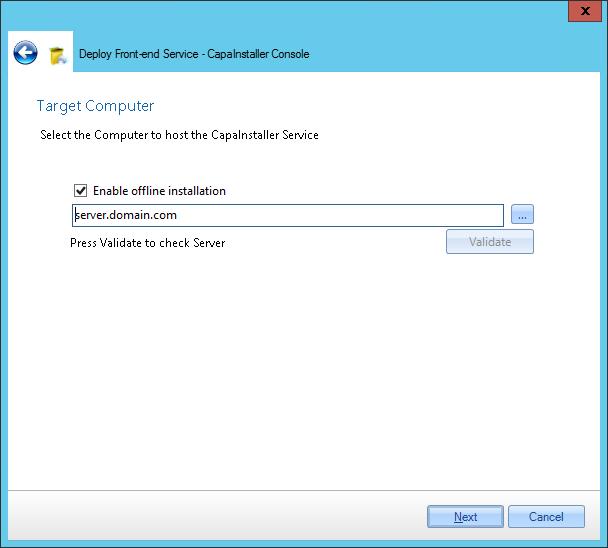
- **Input** target computer for the service and **check** *Enable offline installation*
- **Log in** as an administrator on the target computer
- Open a browser and c**heck** that the browser is in a state where downloads are allowed.
- **Insert URL** to the Back-end service appending */Install* and *fqdn=The target computers DNS name*
```java
http://\:\/ciBackend/Install?fqdn=\
```
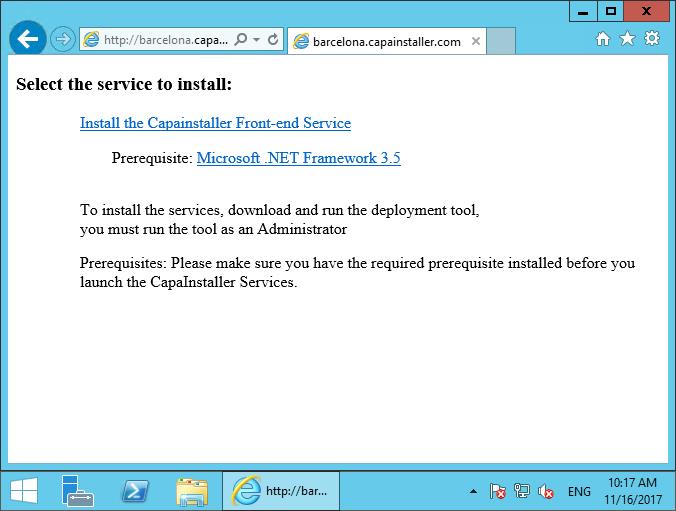
- Microsoft .NET Framework 4.6.2 is a prerequisite - if. NET4.6.2 is not available on the server **Click the link** to install
- **Click** *Install the Service* - The installer executable file will be downloaded
- **Execute** the downloaded installer file
### Read More
- [Network Boot Profiles](/capainstaller/the-capainstaller-console/os-deployment/how-to-use-osd/network-boot-profiles/)
- [Create a boot image](/capainstaller/the-capainstaller-console/os-deployment/how-to-use-osd/create-a-boot-image/)