# DHCPproxy service
> What the CapaInstaller DHCP Proxy does, starting with PXE client platform detection.
Source: https://docs.capaone.com/capainstaller/the-capainstaller-console/system-administration/what-is-system-administration/services/dhcpproxy-service/
Product: CapaInstaller — a separate CapaSystems product; do not apply this page to any other.
# Introduction
The following is a description of the CapaInstaller DHCP Proxy (ciDHCPProxy)
### Purpose
- PXE client platform detection. Legacy BIOS bootstrap files are 16 bit and UEFI can be both 32 and 64 bit. As 64 bit UEFI has no 32-bit compatibility mode a bootstrap file for the correct architecture must be offered via PXE.
A standard DHCP server cannot evaluate and return differentiated bootstrap files pr. architecture. To evaluate the request and return a working bootstrap file for the client, the ciDHCPproxy can be used.
- UDP broadcast relay. If there are challenges in the enterprise infrastructure setting up [udp helper addresses](http://en.wikipedia.org/wiki/UDP_Helper_Address) on the routers separating the network segments, the ciDHCPproxy can be installed on a client, catching the broadcast information and relaying it via a normal port forward.
### Requirements
Windows 7 / Windows Server 2008 or above
.NET 4.0
### Installation, startup, and removal
CiDHCPproxy is located in the "Mediamaster\Resources" catalog and can be installed by starting the ciDHCPProxy.exe as an administrator and clicking Install.
The CiDHCPproxy service is a standard Microsoft Windows service and can be managed with the "Services" MMC snap-in GUI or from the command line with the Windows [Sc command](http://technet.microsoft.com/en-us/library/cc754599.aspx).
Commandline startup of the service
**Cmd**
```cmd
sc start ciDhcpProxy
```
Commandline installation
**Cmd**
```cmd
sc create ciDHCPProxy binpath= "C:\Program Files\CapaInstaller\Services\ciDHCPProxy\ciDHCPProxy.exe"
```
Commandline removal
**Cmd**
```cmd
sc delete ciDHCPProxy
```
Read more about managing and controlling Windows services on Microsoft Technet:
[Microsoft Services How To...](http://technet.microsoft.com/en-us/library/cc758812%28v=ws.10%29.aspx)
### Configuration
Configure your settings by entering the DNS name or IP for the OSDeployment Server in the configuration dialog.
| Installation and configuration dialog |
|:-------------------------------------------------------------------------|
| 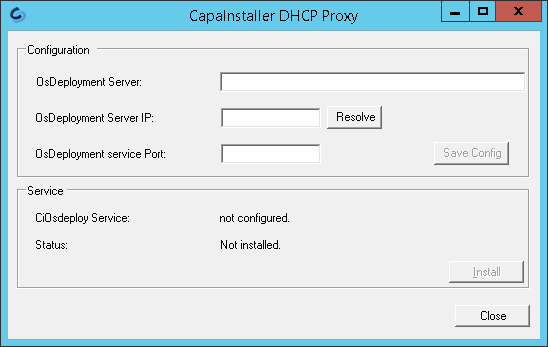 |
These settings are saved in the "proxy.ini" file located in the same directory as the executable.
If there is a need for more ciDHCPProxy installations in the infrastructure you can use this proxy.ini file for a deployment package.
### Deployment
To deploy the proxy service create a CapaInstaller package containing your configured proxy.ini. Use FileCopy to copy the proxy.ini file to the target system and add the command lines below to the package with ShellExecute.
**Cmd**
```cmd
sc create ciDhcpProxy binpath= "C:\Program Files\CapaInstaller\Services\ciDHCPProxy\CiDHCPproxy.exe" start= delayed-auto DisplayName= CapaInstaller DHCP proxy"
sc start ciDhcpProxy
```
The ciDHCPProxy will be installed as a service in "C:\Program Files\CapaInstaller\Services\ciDHCPProxy"
### Network Configuration
The ciDHCPProxy communicates with the standard DHCP and TFTP UDP ports
| | | | |
|-----:|:---|:----|:-----------------------------------------------------------------------------------------------------------------------------------------------------------------------------------------------------------------------------------------------------------------------------|
| 67 | | UDP | [Bootstrap Protocol](http://en.wikipedia.org/wiki/Bootstrap_Protocol "Bootstrap Protocol") (BOOTP) Server; also used by [Dynamic Host Configuration Protocol](http://en.wikipedia.org/wiki/Dynamic_Host_Configuration_Protocol "Dynamic Host Configuration Protocol") (DHCP) |
| 68 | | UDP | [Bootstrap Protocol](http://en.wikipedia.org/wiki/Bootstrap_Protocol "Bootstrap Protocol") (BOOTP) Client; also used by [Dynamic Host Configuration Protocol](http://en.wikipedia.org/wiki/Dynamic_Host_Configuration_Protocol "Dynamic Host Configuration Protocol") (DHCP) |
| 4011 | | UDP | Alternative [Dynamic Host Configuration Protocol](http://en.wikipedia.org/wiki/Dynamic_Host_Configuration_Protocol "Dynamic Host Configuration Protocol") (DHCP) listener port used if installed on the same server as the DHCP service |
If the ciDHCPprocy is installed on the DHCP server an additional option 60 must be set to direct the client requests to the ciDHCPproxy which will handle the platform detection for PXE boot requests from UEFI machines.
Read more about PXE on Wikipedia
[Preboot Execution Environment](http://en.wikipedia.org/wiki/Preboot_Execution_Environment)