# Create Software vendor report
> Create a software vendor report.
Source: https://docs.capaone.com/capainstaller/the-capainstaller-console/reporting-and-queries/how-to-use-reporting/create-software-vendor-report/
Product: CapaInstaller — a separate CapaSystems product; do not apply this page to any other.
The columns in the views are added in the column setup form. Look below to see how.
| | |
|:---------|:-----------------------------------------------------------------------------------------------------------------|
| **Step** | **Action** |
| 1 | Click on *Reporting and Queries.* |
| 2 | Click *Software* |
| 3 | Click on *Tools*/*Software Vendor report.* 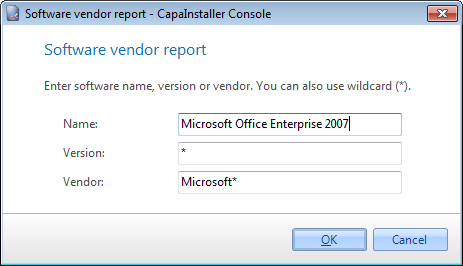 |
| 4 | Enter a name, version, or vendor to collect data from. \* Can be used a wildcard. |
| 5 | Click OK to save the Software vendor report. It will not be saved to the database. |
| 6 | Now the Software Vendor report can be displayed in the content view or deployed to reporting services. |
**To see the Software vendor report follow the guide below**
| | |
|:---------|:-----------------------------------------------------------------------------------------------------------------------|
| **Step** | **Action** |
| 1 | Click on *Reporting and Queries.* |
| 2 | Click *Software* |
| 3 | Right-click the Application groups folder
 |
| 4 | Click the Software Vendor report menu item
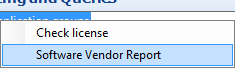 |
| 5 | The Software Vendor report will now be displayed in the content view |
| | |
|:-----------------------------|:----------------------------------------------------------------------------------|
| **If you want to...** | **You can...** |
| Export to reporting services | [Deploy to reporting services](/capainstaller/the-capainstaller-console/reporting-and-queries/how-to-use-reporting/deploy-to-reporting-services/) to see how. |