# Create linked reports to Business units
> Create linked reports per business unit on the Reporting Services server, each in its own folder.
Source: https://docs.capaone.com/capainstaller/the-capainstaller-console/reporting-and-queries/how-to-use-reporting/create-linked-reports-to-business-units/
Product: CapaInstaller — a separate CapaSystems product; do not apply this page to any other.
Create linked reports for each Business Units on the Reporting Services server. Each Business Unit is created as a folder, and linked reports is created in each of the Business Unit.
To create reports used for linked reports go to [Create report for linked reports with Business Unit](/capainstaller/the-capainstaller-console/reporting-and-queries/how-to-use-reporting/create-report-for-linked-reports-with-business-unit/).
Read here about, [Reporting Services linked reports](/capainstaller/the-capainstaller-console/reporting-and-queries/what-is-reporting/reporting-services-linked-reports/)
| | |
|:---------|:--------------------------------------------------------------------------------------------------------------------------------------------------------------------------------------------------------------------------------------------------------------------------------------------------------------------------------------------------------------------------------------------------------------------------------------------------------------------------------------------------------------------------------------------------------------------------------|
| **Step** | **Action** |
| 1 | Click on *File/Create linked reports to Business units*, the following window will open. 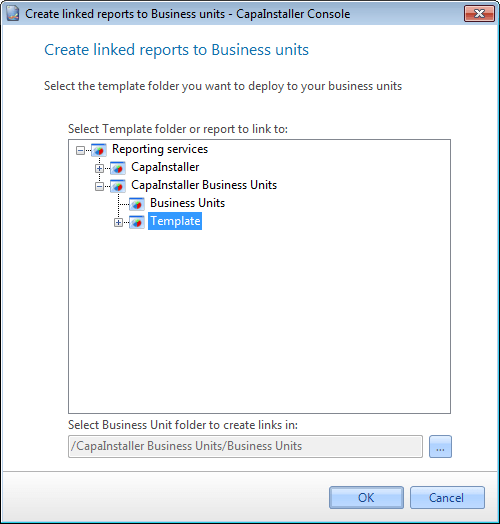 |
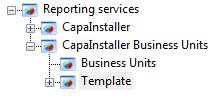
| 2 | In the treeview select the template item, you want to create as linked reports. It can be a folder or a specific report.
If a folder is selected, this folder can contain subfolders, which also will be created under each Business Unit.
The reports to be used for linked reports must contain a parameter for Business unit (Para\_Bu), or a linked report for that report, will not be created.
Template is pre-selected as default, and will be saved when cloing the form.
 |
| 3 | Select the folder to position the linked reports in. The folder "/CapaInstaller Business Units/Business Units" is pre-selected default.
Business Units folder is pre-selected as default, and will be saved when closing the form.
 |
| 4 | The folder structure under CapaInstaller Business Units is created when connecting to Reporting Services first time.
 |
| 5 | *Click OK* to create the linked reports. |
| | |
|:---------------------------------|:----------------------------------------------------------------------------------------------------------------------------|
| **If you want to...** | **You can...** |
| Create a custom made report | [Create a report](/capainstaller/the-capainstaller-console/reporting-and-queries/how-to-use-reporting/create-a-report/) to see how. |
| Create report for linked reports | [Create report for linked reports with Business Unit](/capainstaller/the-capainstaller-console/reporting-and-queries/how-to-use-reporting/create-report-for-linked-reports-with-business-unit/) |
| Manage report services | [Manage reporting services](/capainstaller/the-capainstaller-console/reporting-and-queries/how-to-use-reporting/manage-reporting-services/) to see how. |
| Deploy to reporting services | [Deploy to reporting services](/capainstaller/the-capainstaller-console/reporting-and-queries/how-to-use-reporting/deploy-to-reporting-services/) to see how. |
| What is | [Reporting Services linked reports](/capainstaller/the-capainstaller-console/reporting-and-queries/what-is-reporting/reporting-services-linked-reports/) |