# Patch management tree view
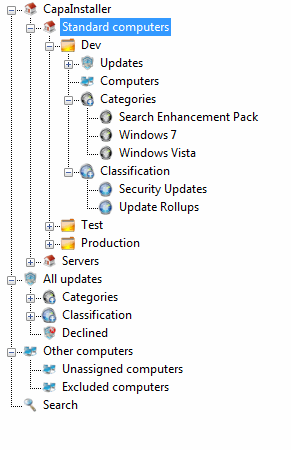
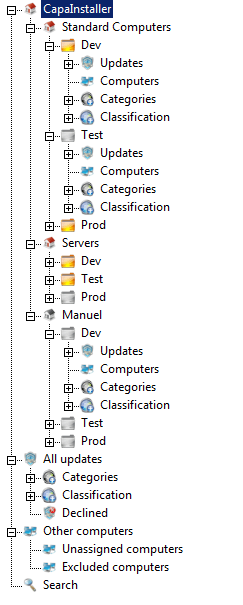
> The three levels of the Patch Management tree: root point, child points, and groups.
Source: https://docs.capaone.com/capainstaller/the-capainstaller-console/patch-management/patch-management-tree-view/
Product: CapaInstaller — a separate CapaSystems product; do not apply this page to any other.
The following is a description of the Patch Management tree view in the main window.
## The Patch Management tree
The tree is organized in three levels:
- **Patch Management root point** — the first element in the tree view. There can only be one root point.
- **Patch Management child points** (for example *Standard computers*) — below the root point there can be one or more child points, which contain the groups.
- **Patch Management groups** (for example *Dev*, *Test*, *Production*) — below the child points there can be one or more groups, which contain the updates and computers.
Under each group, folders containing updates, categories, classifications, and computers are displayed:
- [Updates](/capainstaller/the-capainstaller-console/patch-management/what-is-patch-management/updates/) and [All updates](/capainstaller/the-capainstaller-console/patch-management/what-is-patch-management/all-updates/) — the full collection of updates.
- [Computers in Patch Management](/capainstaller/the-capainstaller-console/patch-management/what-is-patch-management/computers-in-patch-management/) and [All computers](/capainstaller/the-capainstaller-console/patch-management/what-is-patch-management/all-computers/) — used for maintenance of the computers.
- [Categories and Classifications](/capainstaller/the-capainstaller-console/patch-management/what-is-patch-management/categories-and-classifications/) — the categories and classifications available for the updates.
The Patch Management tree: root point → child points → groups.
## Missing points or groups
If one or more of your Patch Management points or groups are deleted or missing on the WSUS server, the tree view shows them differently: the icon turns black and white, and you cannot perform all the actions on that point or group.
A missing or deleted point or group appears with a black-and-white icon.
To re-create the missing points and groups, see [Re-create Patch Management Point or Group](/capainstaller/the-capainstaller-console/patch-management/how-to-use-patch-management/re-create-patch-management-point-or-group/).
## Related tasks
| | |
|:--------------------------|:---------------------------------------------------------------------------------------------------------------------------------------|
| **If you want to...** | **You can...** |
| Create root point | [Patch Management root points](/capainstaller/the-capainstaller-console/patch-management/what-is-patch-management/patch-management-root-points/) |
| Create child point | [Create a Patch Management child point](/capainstaller/the-capainstaller-console/patch-management/how-to-use-patch-management/create-a-patch-management-child-point/) |
| Create group | [Create a Patch Management Group](/capainstaller/the-capainstaller-console/patch-management/how-to-use-patch-management/create-a-patch-management-group/) |
| Re-create point or groups | [Re-create Patch Management Point or Group](/capainstaller/the-capainstaller-console/patch-management/how-to-use-patch-management/re-create-patch-management-point-or-group/) |
| Approve updates | [Approve updates](/capainstaller/the-capainstaller-console/patch-management/how-to-use-patch-management/approve-updates/) |