# Re-create Patch Management Point or Group

> Re-create Patch Management points and groups on the WSUS server when they are reported as missing.

Source: https://docs.capaone.com/capainstaller/the-capainstaller-console/patch-management/how-to-use-patch-management/re-create-patch-management-point-or-group/  
Product: CapaInstaller — a separate CapaSystems product; do not apply this page to any other.

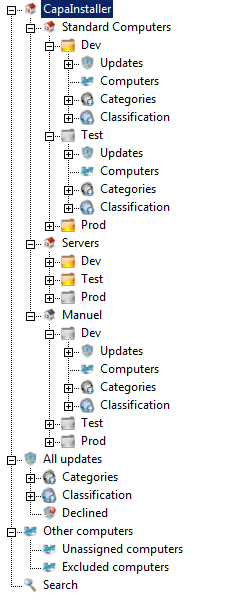
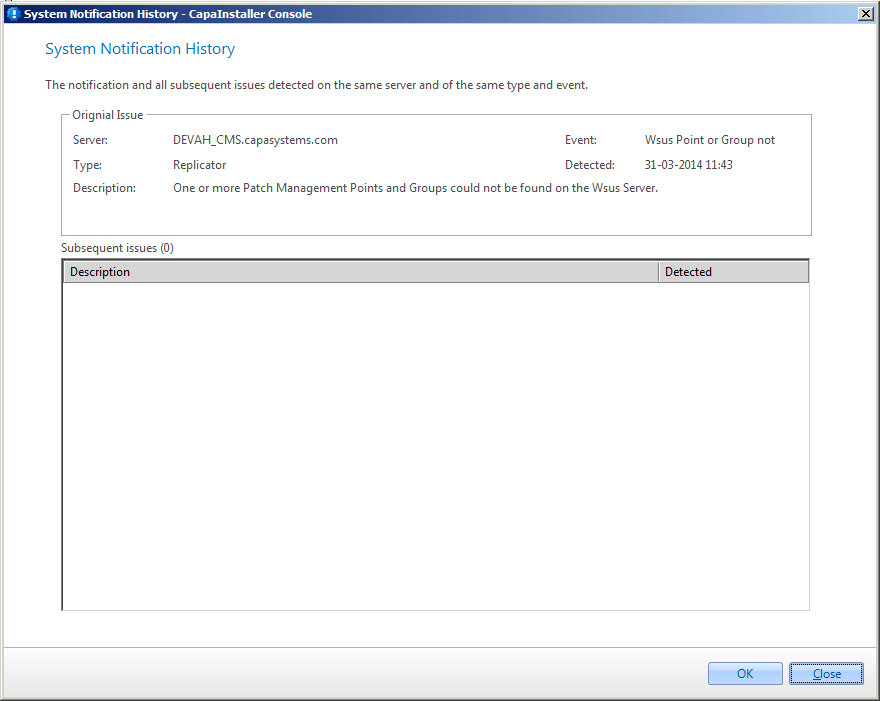
If you get a notification or the Points or Groups are marked as not existing on Wsus Server, then do the following to re-create the Patch Management Points and Groups on the Wsus Server.

|          |                                                                                                                                                                                                                      |
|:---------|:---------------------------------------------------------------------------------------------------------------------------------------------------------------------------------------------------------------------|
| **Step** | **Action**                                                                                                                                                                                                           |
| 1        | With deleted or missing Points or Groups, the treeview could look like this, with one or more Point and Group with black and white icons <br/> ![](/attachments/capainstaller/f79c4a2d-273f-4594-8b7d-eaff95985469.png) |
| 2        | The Notification looks like this <br/> ![](/attachments/capainstaller/883e693d-2932-40da-9301-e4c70307976e.png)                                                                                                         |
|          |                                                                                                                                                                                                                                                                                                                                                                                                                |
|:---------|:---------------------------------------------------------------------------------------------------------------------------------------------------------------------------------------------------------------------------------------------------------------------------------------------------------------------------------------------------------------------------------------------------------------|
| **Step** | **Action**                                                                                                                                                                                                                                                                                                                                                                                                     |
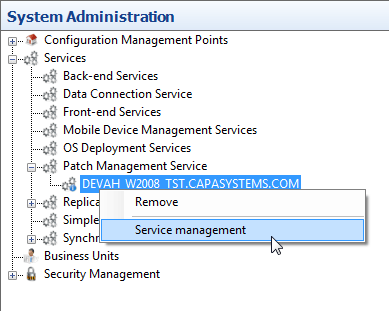
| 1        | Go to the System plugin. Find the Patch Management Service. Right-Click the Service and choose Service Management <br/> ![](/attachments/capainstaller/a3b182f2-b7ac-4abc-986d-1f1825320f91.png)                                                                                                                                                                                                                  |
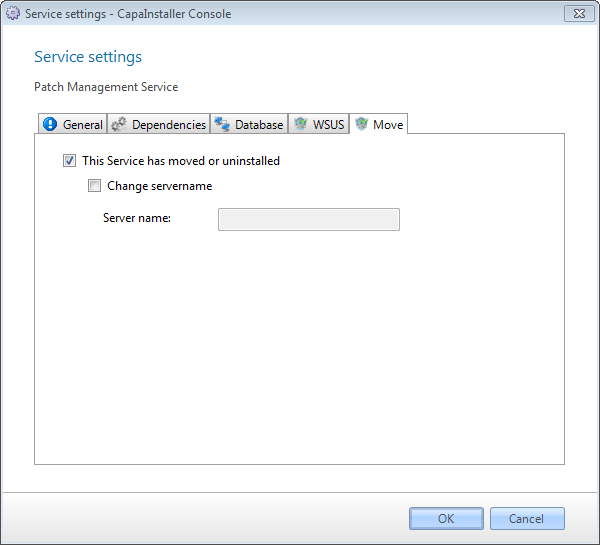
| 2        | Go to the *Move* tab and check the *This Service has moved or uninstalled.* <br/> This will have the service check if all Points and Groups exist on the Wsus Server. If they do not exist, the service will re-create it. <br/> After that, the update approval status from the database will be synchronized to the Wsus Server. <br/> ![](/attachments/capainstaller/7c5807c6-60ac-44a2-81d3-0b11a1fb523e.png) |
| 3        | Click *OK*                                                                                                                                                                                                                                                                                                                                                                                                     |
| 4        | Then restart the Patch Management Service                                                                                                                                                                                                                                                                                                                                                                      |

|                       |                                                                                                                   |
|:----------------------|:------------------------------------------------------------------------------------------------------------------|
| **If you want to...** | **You can...**                                                                                                    |
| Create a root point   | [Patch Management root points](/capainstaller/the-capainstaller-console/patch-management/what-is-patch-management/patch-management-root-points/)           |
| Create a child point  | [Create a Patch Management child point](/capainstaller/the-capainstaller-console/patch-management/how-to-use-patch-management/create-a-patch-management-child-point/)                       |
| Move Service          | [Patch Management Service settings](/capainstaller/the-capainstaller-console/patch-management/what-is-patch-management/patch-management-service-settings/) |
| Approve updates       | [Approve updates](/capainstaller/the-capainstaller-console/patch-management/how-to-use-patch-management/approve-updates/)                                                                           |
