# Create a boot image

> How to create 32-bit and 64-bit UEFI boot images in CapaInstaller OS Deployment.

Source: https://docs.capaone.com/capainstaller/the-capainstaller-console/os-deployment/how-to-use-osd/create-a-boot-image/  
Product: CapaInstaller — a separate CapaSystems product; do not apply this page to any other.

The following is a description of how to create boot images in CapaInstaller.

|          |                                                                                                                                                                                                                                                                                                                                                                                                                                                                    |
|:---------|:-------------------------------------------------------------------------------------------------------------------------------------------------------------------------------------------------------------------------------------------------------------------------------------------------------------------------------------------------------------------------------------------------------------------------------------------------------------------|
| **Step** | **Action**                                                                                                                                                                                                                                                                                                                                                                                                                                                         |
| 1        | Click *File* menu and then *Create boot file*.                                                                                                                                                                                                                                                                                                                                                                                                                     |
| 2        | Choose the type of boot image you want to create <br/>   ![The Create Boot Image dialog](/attachments/capainstaller/94033d7a-bb40-4efa-8e7a-7bd7341b0653.png)                                                                                                                                                                                                                                                                                                                                  |
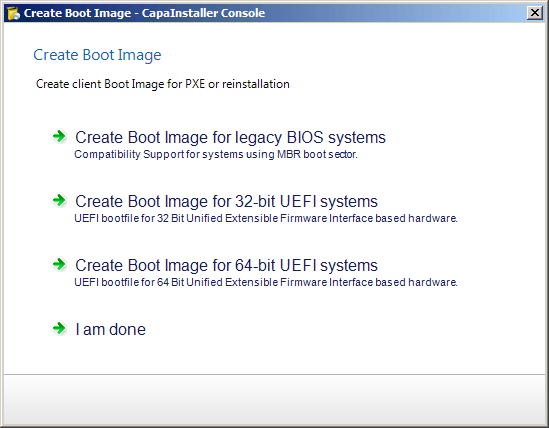
| 3        | For 32-bit and 64-bit UEFI systems, follow this guide: [Creating an UEFI boot image](/capainstaller/the-capainstaller-console/os-deployment/how-to-use-osd/create-a-boot-image/creating-an-uefi-boot-image/) <br/>❗ UEFI Boot files <br/>  It is necessary to create a boot file for both 32-bit and 64-bit systems when both types of systems have to be supported |
| 4        | Click *I am done* when done                                                                                                                                                                                                                                                                                                                                                                                                                                        |

## Related

- [What is WinPE](/capainstaller/the-capainstaller-console/os-deployment/what-is-os-deployment/winpe/)
- [Install Windows ADK and Windows PE](/capainstaller/knowledge-base/osd-installation-of-windows-adk-and-winpe/)
- [Update the boot image on all OSD servers](/capainstaller/the-capainstaller-console/os-deployment/how-to-use-osd/update-osd-servers/)
