# Custom Fields Installation

> Create custom fields for an OSD point and business unit, shown when you PXE boot a client.

Source: https://docs.capaone.com/capainstaller/the-capainstaller-console/os-deployment/how-to-use-osd/configure-an-os-deployment-point/custom-fields-installation/  
Product: CapaInstaller — a separate CapaSystems product; do not apply this page to any other.

# Introduction

The following is a description of how to create custom fields for OSD point and BU when you PXE boot your client.

## How to config Custom Fields Installation

|   Step | To do                                                                                                                                                                                                                                                                                                                                                                                                                                                                                                                                                                                                 |
|-------:|:------------------------------------------------------------------------------------------------------------------------------------------------------------------------------------------------------------------------------------------------------------------------------------------------------------------------------------------------------------------------------------------------------------------------------------------------------------------------------------------------------------------------------------------------------------------------------------------------------|
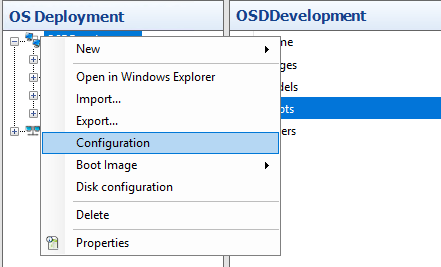
|      1 | Go in to "OS Deployment, and right click your OSD point and click on "Configuration" <br/> ![](/attachments/capainstaller/4cb084b6-001f-40b5-8883-5f316a7d49c6.png)                                                                                                                                                                                                                                                                                                                                                                                                                                   |
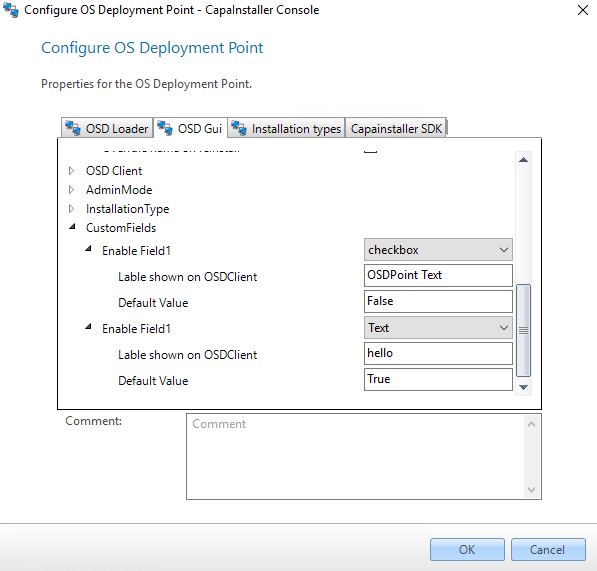
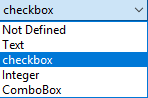
|      2 | Click on "OSD Gui" and scroll down to the CustomFields" <br/> Here, you have five opportunities, you can choose to your Custom Field. <br/> There is a label shown in your OSDClient and a default value. <br/> ![](/attachments/capainstaller/d8251986-0df6-4bd3-8006-bca726e64b8c.png) <br/> ![](/attachments/capainstaller/de2c3dc2-7f52-478c-a9fa-9688ec94f146.png) <br/> **Default Value for "checkbox" can only be TRUE or FALSE** <br/> **Default Value for "Integer" can only be a number** <br/> **Default Value for "text" is optional** <br/> **Default Value for "ComboBox" is optional** |
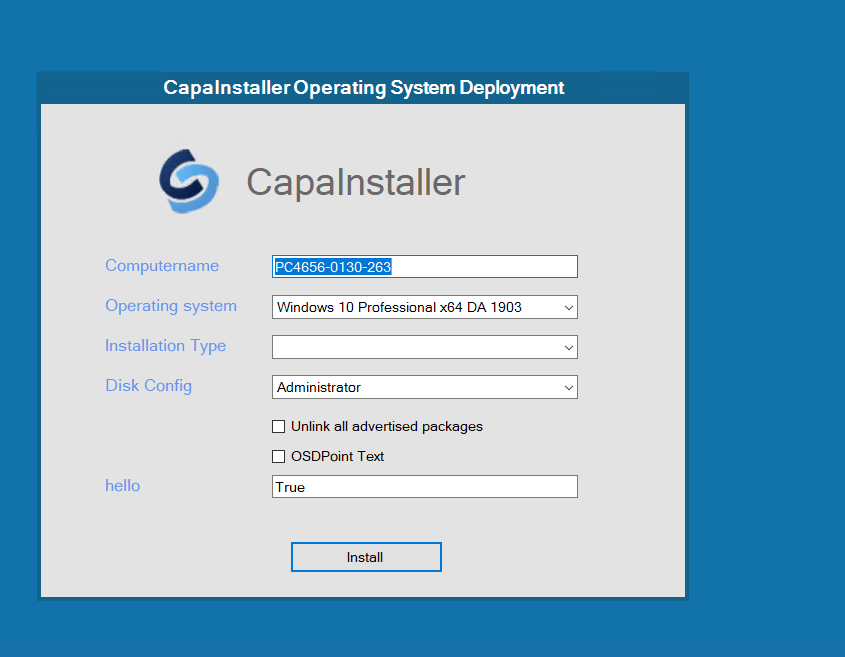
|      3 | Now PXE boot your client, and you will have shown you Custom Fields as shown here: <br/> ![](/attachments/capainstaller/9f20ab23-73de-4921-9bd9-75b6603fe37e.png)                                                                                                                                                                                                                                                                                                                                                                                                                                     |