# Configure a disk
> Add and configure a disk configuration on the root deployment point.
Source: https://docs.capaone.com/capainstaller/the-capainstaller-console/os-deployment/how-to-use-osd/configure-a-disk/
Product: CapaInstaller — a separate CapaSystems product; do not apply this page to any other.
The following is a description of how to configure a disk.
## Add a disk configuration
| Step | Action |
|:----:|:-------|
| 1 | Right-click on the root deployment point. |
| 2 | The following window appears.
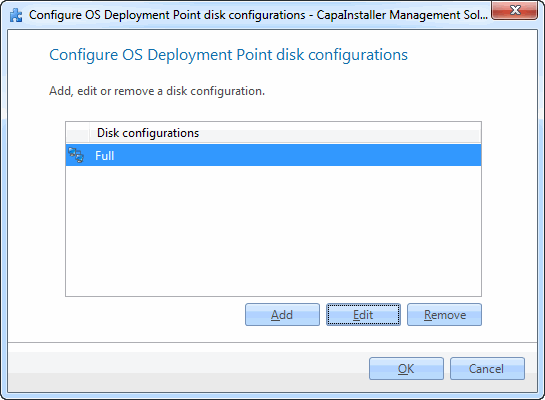 |
| 3 | Click *Add*. |
| 4 | The following window appears.
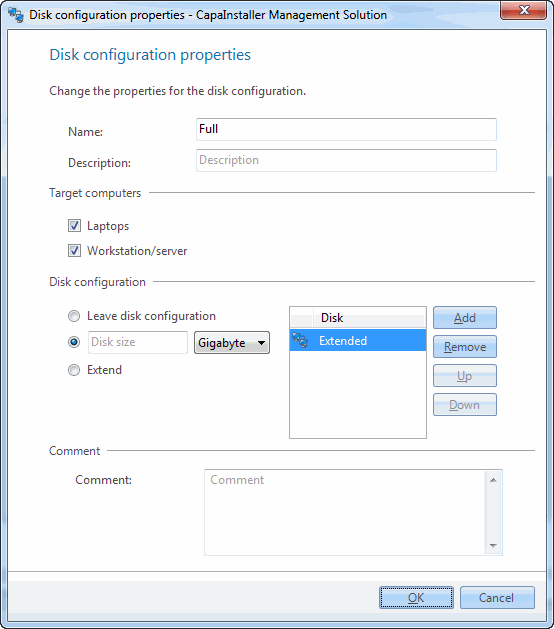 |
| 5 | Fill in the details and click *OK*. |
## Related tasks
| If you want to… | You can… |
|:-----------------------|:----------------|
| Edit an existing disk | Right-click on the OS Deployment point, click *Configure disk*, then click *Edit* and make the necessary corrections. |
| Know more about the details | See [Disk configuration](/capainstaller/the-capainstaller-console/os-deployment/what-is-os-deployment/disk-configuration/). |