# General menu description
> The console menus and menu items that stay the same regardless of which module is active.
Source: https://docs.capaone.com/capainstaller/the-capainstaller-console/general-console-settings-and-views/general-menu-description/
Product: CapaInstaller — a separate CapaSystems product; do not apply this page to any other.
Some menus and menu items remain the same regardless of the module activated; others will change according to the module activated. The following is a description of the general menus in the CapaInstaller Management Solution. Links to descriptions of the menus for each module are also included.
## Menus
| | | | | | | |
|:-------------------------------------------------------------------|:-------------------------------------------------------------------|:-------------------------------------------------------------------|:-------------------------------------------------------------------|:-------------------------------------------------------------------|:-------------------------------------------------------------------|:-------------------------------------------------------------------|
|  |  |  |  |  |  |  |
| |
|:--------------------------------------------------------------------------------------------------------------------------------------------------------------------------------------------------------------------------------------------------------------------------------------------------------------------------------------------------------------------------------------------------------------------------------------------------------------------------------------------------------------------------------------------------------------------------------------------------------------------------------------------------------------------------------------------------------------------------------------------------------------------------------------|
| The console menu is context-sensitive, i.e. each module in CMS will have specific functions available. For further information on each menu, click the links below:
- [Toolbar and menu description for Asset Management](/capainstaller/the-capainstaller-console/asset-management/toolbar-and-menu-description-for-asset-management/)
- [Toolbar and menu description for Configuration Management](/capainstaller/the-capainstaller-console/configuration-management/toolbar-and-menu-description-for-configuration-management/)
- [Toolbar and menu description for OSD](/capainstaller/the-capainstaller-console/os-deployment/what-is-os-deployment/toolbar-and-menu-description-for-osd/)
- [Toolbar and menu description for Reporting](/capainstaller/the-capainstaller-console/reporting-and-queries/toolbar-and-menu-description-for-reporting/) |
| | |
|:------------------|:--------------------|
| **File menu** | **Description** |
| Exit | Closes the program. |
| | |
|:------------------|:------------------------------------------------------------------------|
| **Edit menu** | **Description** |
| Select All | Selects all items in the folder currently marked in the tree view pane. |
| | |
|:--------------|:-----------------------|
| **View menu** | **Description** |
| View log | Opens the current log. |
| Go to | Go to any application. |
| | |
|:------------------|:--------------------------------------------------------------------------------------------------------------|
| **Go menu** | **Description** |
| Installed modules | Goes to the individual plugin installed. 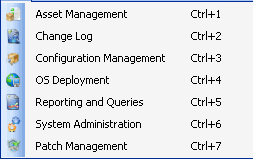 |
| | |
|:------------------------------------------------|:-----------------------------------------------------------------------------|
| **Tools menu** | **Description** |
| Change License | Makes it possible to change your license. |
| [Database connection](/capainstaller/the-capainstaller-console/general-console-settings-and-views/database-connection/) | Lets you customize the database settings. |
| [Options](/capainstaller/the-capainstaller-console/general-console-settings-and-views/options/) | Lets you change the default settings. The options are individual per Module. |
| | |
|:---------------------|:------------------------------------------------------------------------------------------------------------------------------------------------------------------------|
| **Help menu** | **Description** |
| CapaWiki | Links to the online Wiki page of CapaSystems |
| Create documentation | Creates the documentation of the CapaInstaller product installed |
| About | Displays information about the current version, including license details and the version number. 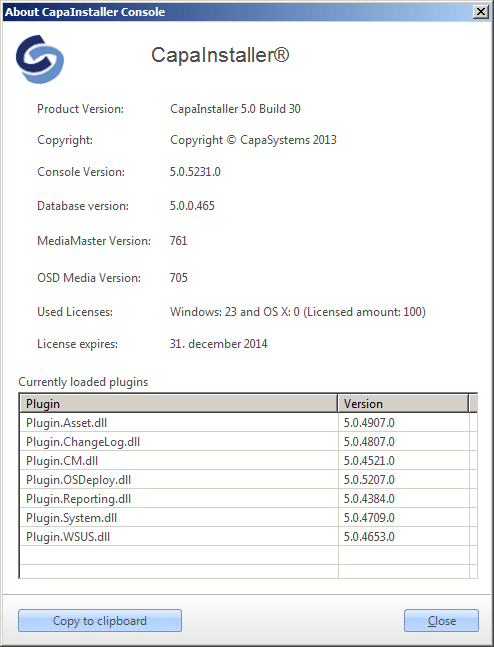 |