# Changelog full-text index search
> Set up the MSSQL full-text index that the changelog full-text search requires.
Source: https://docs.capaone.com/capainstaller/the-capainstaller-console/general-console-settings-and-views/change-log/changelog-full-text-index-search/
Product: CapaInstaller — a separate CapaSystems product; do not apply this page to any other.
To use the changelog full-text index search, you must install the MSSQL Full-text index service, and create the Full-Text index on the text columns in the Changelog table.
| | |
|:---------|:----------------------------------------------------------------------------------------------------------------------------------------------------------------------------------------------------------------------------------------------------------------------------------------------------------------------------------------------------------------------------------------------------------------------|
| **Step** | **Action** |
| 1 | If you are running SQL Express you must run the SQL Server Express with Advanced Services to install the Full-Text index service.
On Enterprise edition, you must run the Setup again, and enable the feature Full-Text index. |
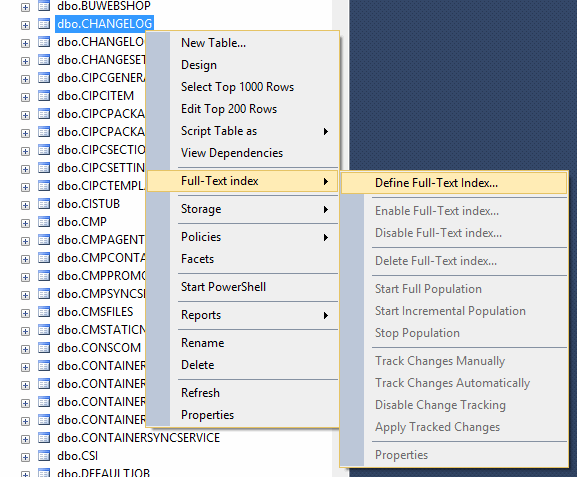
| 2 | When the Full-text index service or feature has been enabled, the full-text index should be created on the columns SystemDesc, UserDesc, and CreatedBy in table Changelog.
Go to the MSSQL Manager right-click the Changelog table, and choose *Full-Text index* and then *Define Full-Text Index*. Follow the guide.
 |
| 3 | Building the Full-Text index can take some time. And before that is done, the Full-Text index is not ready to be used. |
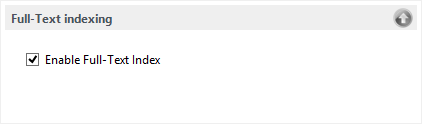
| 4 | Then go to the Changelog Options and *Enable Full-Text Index*.
 |
## Related
- [Changelog introduction](/capainstaller/the-capainstaller-console/general-console-settings-and-views/change-log/changelog-introduction/)
- [Changelog simple search](/capainstaller/the-capainstaller-console/general-console-settings-and-views/change-log/changelog-simple-search/)
- [Changelog advanced search](/capainstaller/the-capainstaller-console/general-console-settings-and-views/change-log/changelog-advanced-search/)