# Reinstall a computer

> How to schedule a computer reinstall from Configuration Management using OS Deployment settings.

Source: https://docs.capaone.com/capainstaller/the-capainstaller-console/configuration-management/how-to-use-configuration-management/working-with-devices/reinstall-a-computer/  
Product: CapaInstaller — a separate CapaSystems product; do not apply this page to any other.

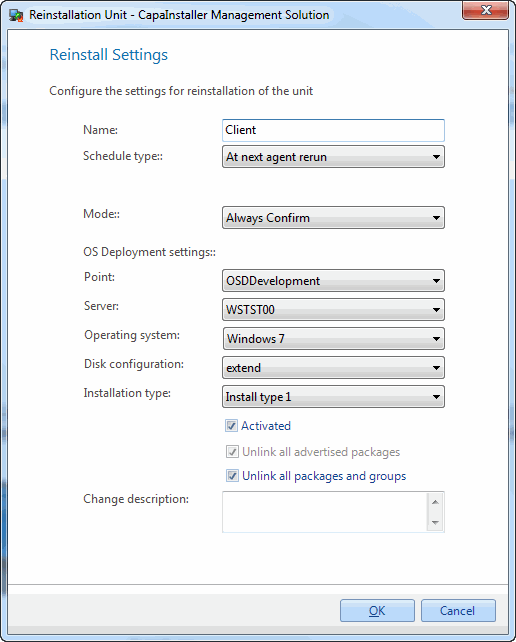
From Configuration Management you can schedule a computer to be reinstalled using [OS Deployment](/capainstaller/the-capainstaller-console/os-deployment/) settings. These settings are required in order to set up a computer to be reinstalled.  
 A new name for the computer can be specified, and it can be scheduled to occur at a time where it isn’t being used after work hours. If it is more urgent it can be configured to reinstall the computer the next time the CapaInstaller Agent runs.
![](/attachments/capainstaller/fbf7d4f4-7722-4fdf-a011-fa7003d62634.webp)

|                                                                                                            |                                                                                                                                                                                          |
|:-----------------------------------------------------------------------------------------------------------|:-----------------------------------------------------------------------------------------------------------------------------------------------------------------------------------------|
| **Element**                                                                                                | **Description**                                                                                                                                                                          |
| Name                                                                                                       | This will be the name of the computer after reinstalling it.                                                                                                                             |
| Schedule Type                                                                                              | You can choose between two schedule types. <br/>- At the next agent rerun<br>- Custom schedule  While configuring a custom schedule you will be able to include an, wake on LAN request. |
| Mode                                                                                                       | Choose whether or not the user needs to confirm the reinstall.                                                                                                                           |
| [OS Deployment points](/capainstaller/the-capainstaller-console/os-deployment/what-is-os-deployment/os-deployment-points/)   | The OS Point being used.                                                                                                                                                                 |
| [OS Deployment servers](/capainstaller/the-capainstaller-console/os-deployment/what-is-os-deployment/os-deployment-servers/) | A server on the OS Point selected.                                                                                                                                                       |
| [Images](/capainstaller/the-capainstaller-console/os-deployment/what-is-os-deployment/images/)                                   | An Operating System on the OS Point selected.                                                                                                                                            |
| [Disk configuration](/capainstaller/the-capainstaller-console/os-deployment/what-is-os-deployment/disk-configuration/)         | A Disk Configuration on the OS Point selected.                                                                                                                                           |
| Installation type                                                                                          | An Installation Type. This is not mandatory.                                                                                                                                             |
| Activated                                                                                                  | While this is unchecked the computer will not be reinstalled.                                                                                                                            |
| Unlink all advertised packages                                                                             | Choose whether or not all installed advertised packages should be unlinked from the computer.                                                                                            |
| Unlink all packages and groups                                                                             | Choose whether or not the computer should be unlinked from all groups and packages. Checking this will disable the option regarding advertised packages.                                 |
| Change description                                                                                         | The custom comment that will be added to the changelog.                                                                                                                                  |

|          |                                                                                                                                                                                                  |
|:---------|:-------------------------------------------------------------------------------------------------------------------------------------------------------------------------------------------------|
| **Step** | **Action**                                                                                                                                                                                       |
| 1        | Open CM/find the computer to reinstall, right-click, and click *Reinstall*.                                                                                                                      |
| 2        | Fill out the fields above.                                                                                                                                                                       |
| 3        | Click *OK*.                                                                                                                                                                                      |
| 4        | If the *Custom schedule* has been selected, the settings will be saved and the schedule window will open, enabling you to create a custom schedule that defines when the reinstall should occur. |

## In this section

- [Scheduled reinstalls](/capainstaller/the-capainstaller-console/configuration-management/how-to-use-configuration-management/working-with-devices/reinstall-a-computer/scheduled-reinstalls/)
