# Inventory Management
> The inventory types shown in the detail window, and what each one covers.
Source: https://docs.capaone.com/capainstaller/the-capainstaller-console/asset-management/what-is-asset-management/inventory-management/
Product: CapaInstaller — a separate CapaSystems product; do not apply this page to any other.
# Introduction
The following is a description of Inventory Management. Inventory can be viewed in the detail window and the different types will be explained below.
| | |
|:--------------------------------------------------------------------------------|:-------------------------------------------------------------------------------------------------------------------------------------------------------------------------------------------------------------------------------------------------------------|
| **Element** | **Description** |
| Software
 | Software is collected on the clients from the Software Inventory package and displayed in the detail pane and Reporting. The software can be used to monitor the usage of licenses, create dynamic groups etc. |
| Hardware
| Software is collected on the clients from the Software Inventory package and displayed in the detail pane and Reporting. The software can be used to monitor the usage of licenses, create dynamic groups etc. |
| Hardware
 | Hardware is collected on the clients from the Hardware Inventory package and displayed in the detail pane and Reporting. Hardware inventory can be used for the report, create dynamic groups etc. |
| User
| Hardware is collected on the clients from the Hardware Inventory package and displayed in the detail pane and Reporting. Hardware inventory can be used for the report, create dynamic groups etc. |
| User
 | Users are created when they log on to a CapaInstaller managed computer form. |
| Custom
| Users are created when they log on to a CapaInstaller managed computer form. |
| Custom
 | Custom inventory can be collected on the clients from the Custom Inventory package or entered in Asset Management. Custom inventory will be displayed in the detail pane and Reporting. Custom inventory can be used for reports, create dynamic groups etc. |
| File Scan
| Custom inventory can be collected on the clients from the Custom Inventory package or entered in Asset Management. Custom inventory will be displayed in the detail pane and Reporting. Custom inventory can be used for reports, create dynamic groups etc. |
| File Scan
 | A file scan is collected on the clients from the File Scanner package and displayed in Asset Management. File scan contains all the .exe files from the clients and can be used to identify Software not contain in the Add/Remove Programs. |
| Logon
| A file scan is collected on the clients from the File Scanner package and displayed in Asset Management. File scan contains all the .exe files from the clients and can be used to identify Software not contain in the Add/Remove Programs. |
| Logon
 | Logon is collected on the clients from the Logon Inventory package and displayed in the detail pane and Reporting. Logon Inventory can be used in reports, to keep track of who locks on where and when. |
**Detail view description**
| | |
|:------------|:----------------------------------------------------------------------|
| **Element** | **Description** |
| Hardware | 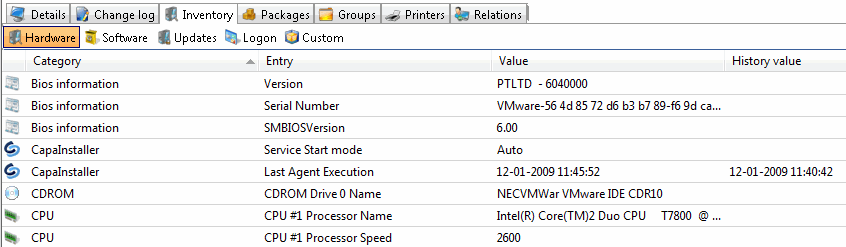 |
| Software | 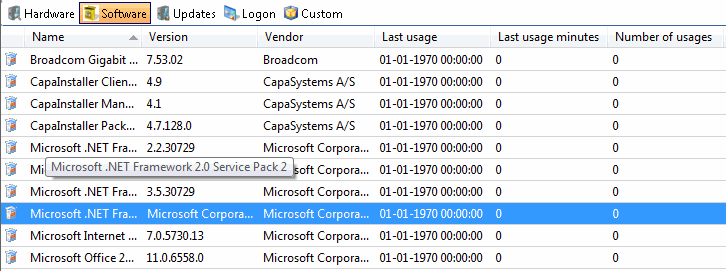 |
| Updates |  |
| Logon | 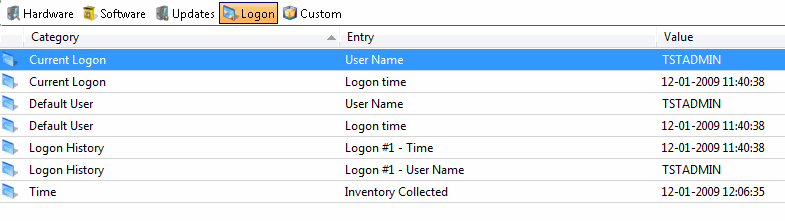 |
| Custom | 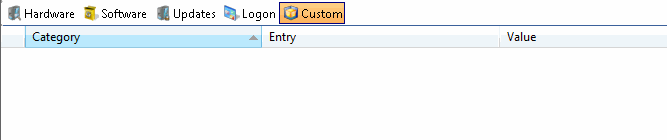 |
:::tip
[Data structure](/capainstaller/the-capainstaller-console/asset-management/what-is-asset-management/data-structure/) to learn more about the data structure of the CapaInstaller Console.
:::
## Related
- [Software](/capainstaller/the-capainstaller-console/asset-management/what-is-asset-management/software/)
- [Discovered applications](/capainstaller/the-capainstaller-console/asset-management/what-is-asset-management/discovered-applications/)
| Logon is collected on the clients from the Logon Inventory package and displayed in the detail pane and Reporting. Logon Inventory can be used in reports, to keep track of who locks on where and when. |
**Detail view description**
| | |
|:------------|:----------------------------------------------------------------------|
| **Element** | **Description** |
| Hardware |  |
| Software |  |
| Updates |  |
| Logon |  |
| Custom |  |
:::tip
[Data structure](/capainstaller/the-capainstaller-console/asset-management/what-is-asset-management/data-structure/) to learn more about the data structure of the CapaInstaller Console.
:::
## Related
- [Software](/capainstaller/the-capainstaller-console/asset-management/what-is-asset-management/software/)
- [Discovered applications](/capainstaller/the-capainstaller-console/asset-management/what-is-asset-management/discovered-applications/)