# Installing the CapaInstaller Self Service Portal
> Install the CapaInstaller Self Service Portal, starting with the back-end service it needs.
Source: https://docs.capaone.com/capainstaller/installation-and-maintenance/how-to-install/installing-the-capainstaller-self-service-portal/
Product: CapaInstaller — a separate CapaSystems product; do not apply this page to any other.
# Introduction
A simple overview of the steps involved in installing the CapaInstaller Self Service Portal
### Deploy a Back-end Service
To be able to communicate with CapaInstaller services and to authenticate against an Active Directory, the Self Service Portal relies on the CapaInstaller Back-end Service.
If you already have a Back-end Service Deployed for other purposes, skip this step.
:::tip
To save time and effort, mark and copy the Back-end service public URL to the clipboard. You will need to enter this URL later when installing the Self Service Portal.
:::
### Read more
- How to [Deploy the Back-end Service](/capainstaller/the-capainstaller-console/system-administration/what-is-system-administration/services/back-end-service/deploy-the-back-end-service/)
### Enable the Web Server
Requirements:
Internet Information Services (IIS) 8.5 or above
.NET 4.5.1 or above
Enable the Web Server (IIS) role on the Windows Server that is set to host the Self Service Portal site. This server's DNS name will be the base URL for access to the Self Service Portal.
### Read more
- [Installing IIS8 on Windows server 2012](https://www.iis.net/learn/get-started/whats-new-in-iis-8/installing-iis-8-on-windows-server-2012)
### Execute the Windows Installer package
Execute the Windows Installer package (**CapaInstaller Self Service Portal****.msi)** for the Self Service Portal.
Locate the file in the share of the root configuration management point e.g. "**...\CMPDEV\Resources\Self Service Portal\CapaInstaller Self Service Portal.msi**"
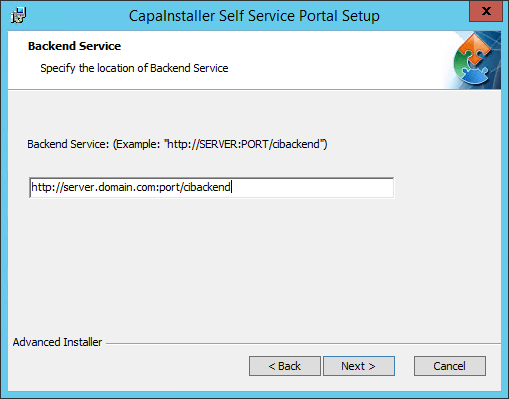
Follow the steps in the guided Setup and enter the URL to the relevant Back-end service, when asked.
### **Installation complete**
:::note
After completing the above steps, the **CapaInstaller Self Service Portal** is installed and ready for use
:::
### Read more
- [Working with Self Service Portal](/capainstaller/the-capainstaller-console/configuration-management/how-to-use-configuration-management/working-with-self-service-portal/)