# CapaBitLocker v4.0 - Release Notes
> What changed in CapaBitLocker v4.0, released 16 December 2022, including new features, improvements, and prerequisites.
Source: https://docs.capaone.com/capainstaller/capabitlocker/capabitlocker-release-notes/capabitlocker-v4-0-release-notes/
Product: CapaInstaller — a separate CapaSystems product; do not apply this page to any other.
*CapaBitLocker v4.0 released on December 16, 2022*
---
### New Features
Windows 11 Support
Windows 11 is supported.
Multiple Drive Support
It's possible to encrypt only the operating system drive or all fixed drives.
Fast and Easy Integration
Integration with Active Directory doesn't require service accounts or group policies.
Recovery Password Backup
Multiple recovery passwords can be saved in Active Directory or CapaInstaller or both.
Encrypt without wait
Encryption can be started without waiting for it to finish, if you want to encrypt drives during your endpoint deployment process.
Multiple domains and standalone endpoints
Multiple domains and standalone endpoints are supported.
Status on dynamic install screen
Encryption and decryption status is presented on the dynamic install screen.
Suspend Drives
It's possible to suspend the operating system drive, if you need to perform an operation that requires BitLocker to be deactivated.
Activate Recovery Mode
It's possible to activate BitLocker Recovery Mode, in case an endpoint has been stolen or is otherwise lost.
---
### Improvements
Improved Logging
Logging has been improved with a simple and a standard log.
Check PreRequisites (optional)
The Check PreRequisites package is now optional.
ReInstall status shown in console
The endpoint **Details** tab shows *Reinstall failed* as the state when a reinstall is aborted.
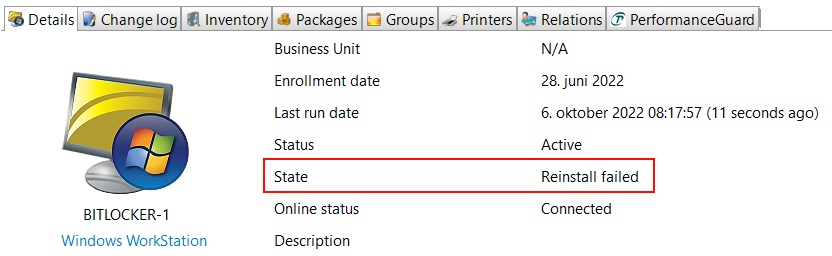
The reason is written to custom inventory under **Inventory → Custom**.

---
### Prerequisites
TPM
TPM version 2.0 or later.
---
### Technical Stuff
Command Line Based
To make troubleshooting easier, all actions are command line based, using PowerShell or `manage-bde.exe`.
Mask Sensitive Data
Recovery key values can be masked to improve security.
Troubleshooting
Issues related to the TPM chip are presented at the top of the log file and in the CapaInstaller console.


Cloud Updater
CapaBitLocker is fully supported by the CapaSystems Cloud Updater, and we can update the scripting library automatically.